Call coaching software helps managers coach reps on real sales calls. Real-time tools prompt the rep during the call, post-call tools score the recording afterward, and practice tools let reps rehearse first. This list compares 19 call coaching tools on timing, CRM fit, analysis depth and pricing, then adds 10 more. For the wider practice, see our sales coaching guide.
Shortlist
Tool | Best for | Why it made the top 3 |
|---|---|---|
PitchMonster | Rehearsing the moment before the live call | It is built as the practice layer for the gap call recorders report, with an AI Coach that asks before it tells |
Gong | Teams with a dedicated RevOps function | Call capture, scoring, deal signals and forecasting in one platform, with AI role-play through Gong Enable |
Mindtickle | Large enablement, training and certification | Call coaching folded into training, AI role-play and readiness scoring |
Why listen to us?
I am Oleg Bolotnov, founder of PitchMonster. Our team builds AI role-play software for sales teams, so we sit on the practice side of call coaching, next to the call recorders in this list.
PitchMonster holds 4.9 out of 5 on G2 (as of October 2026, per the badge on our homepage). Our public case studies include PRN Health Services, with 22.37% higher scores on actual calls over a 60-day window. Mentor Group reported 50% faster ramp-up on average and a 2X reduction in coaching time per rep. SThree reported 2x less coaching time per rep, and JustSchool reported +8.3% new-hire conversion and 5+ hours per week saved per sales leader.
We rank ourselves first, so every competitor fact below comes from public sources: vendor sites checked in October 2026, and G2 scores as of October 2026.
The 19 best call coaching software tools compared
"Coaching style" is the timing axis that should drive your pick. Prices come from each vendor's own site, checked October 2026, and "Not published" means the vendor shows no figure. G2 scores are as of October 2026, shown as the score only, and move over time. Where each tool fits is in the next section.
Tool | Best for | Coaching style | Published price | G2 score |
|---|---|---|---|---|
PitchMonster | Rehearsing the moment before the live call | Practice + AI coaching (pre-call) | By quote | 4.9 |
Gong | Teams with a dedicated RevOps function | Post-call + AI role-play (Gong Enable) | Not published | 4.7 |
Mindtickle | Large enablement, training and certification | Post-call inside a training platform | Not published | 4.7 |
Jiminny | Mid-market B2B teams that want conversation intelligence with a free trial | Post-call coaching | Not published (14-day free trial) | 4.6 |
Balto | Contact centers and high-volume phone teams | Real-time guidance | Not published | 4.8 |
Allego | Enablement teams that want coaching, learning and content together | Post-call + AI role-play inside enablement | Not published | 4.6 |
Salesloft | Teams already running Salesloft or Clari | Both (real-time guidance + post-call) | Not published | 4.5 |
Chorus by ZoomInfo | Teams standardized on ZoomInfo | Post-call + deal signals | Not published | 4.5 |
Salesforce Sales Cloud | Salesforce shops wanting coaching in the CRM | Post-call inside the CRM (Sales Programs) | Sales Programs $100 per user per month; CRM editions $25 to $550 | 4.4 |
Avoma | Teams that want meeting notes, call scoring and CRM updates at listed per-seat prices | Post-call + real-time battlecards | $19 to $39 per recorder per month (annual), CI add-on $29 | 4.6 |
Revenue.io | Salesforce-based teams that want live guidance and AI role-play | Real-time + post-call scoring | Not published | 4.7 |
Dialpad | Outbound teams that want coaching inside their calling platform | Real-time + post-call scoring | Sell $39 to $79 per user per month | 4.4 |
Outreach | Teams already running Outreach | Real-time cards + post-call summaries | Not published (credit packages) | 4.3 |
HubSpot Sales Hub | HubSpot CRM teams that want call recording in the CRM | Post-call inside the CRM | Free plan; paid plans from $7 per seat per month | 4.4 |
Attention | Teams that want botless recording, scorecards and CRM automation | Post-call scorecards + AI agents | Not published | 4.6 |
Modjo | Revenue teams that want call scoring and CRM filling with EU hosting | Post-call scoring | Not published | 4.7 |
Claap | Teams that want a recorder with scoring and a free plan | Post-call scoring and coaching | Free plan; Pro $32, Business $60 per licence per month (yearly) | 4.6 |
Convin | B2C contact centers | Real-time assist + QA scoring | Not published | 4.7 |
Salesken | Sales and support teams that want QA scoring and live prompts | Real-time prompts + QA scoring | Not published | 4.9 |
How we evaluated
We compared the 19 tools on 6 criteria that decide whether reps and managers keep using a coaching tool. They are timing, CRM and dialer fit, analysis depth, coaching workflow, scorecard focus and closing the gap. Each criterion is a question we put to every vendor's own pages, checked in October 2026.
- Does it coach before, during or after the call? That is timing.
- Does it sync with Salesforce, HubSpot or your phone system without extra work? That is CRM and dialer fit.
- Does it go past a transcript into tone, pacing, sentiment, talk-to-listen ratio and objections? That is analysis depth.
- Can a manager coach in the flow, with clips, scorecards and notes? That is the coaching workflow.
- Does it grade a few behaviors well, or 20 badly? That is scorecard focus.
- Does it help a rep fix the skill, or only report it? That is closing the gap.
The scores below are editorial judgment from vendor pages checked in October 2026, not lab tests. A 5 means the vendor's own pages show the capability clearly, a 3 means partly, and a 1 means no sign of it.
For timing, 2 means 1 moment (before, during or after the call), 3 means 1 moment plus a partial second, 4 means 2 moments and 5 means all 3. For CRM and dialer fit, 2 means the pages we read mention CRMs or dialers only by category and name no integration. A 3 means one named integration or a CRM write-back, and a 4 means several named integrations. A 5 means the tool is the CRM or dialer, or is built into it.
We scored all 19 ranked tools on the same 6 criteria, from the same kind of source: each vendor's own pages. A low score means the pages we read show little of that capability, not that the product lacks it.
Tool | Timing | CRM and dialer fit | Analysis depth |
|---|---|---|---|
PitchMonster | 4 | 3 | 3 |
Gong | 4 | 4 | 5 |
Mindtickle | 4 | 3 | 4 |
Jiminny | 2 | 3 | 3 |
Balto | 4 | 4 | 3 |
Allego | 4 | 2 | 3 |
Salesloft | 4 | 3 | 4 |
Chorus by ZoomInfo | 2 | 3 | 4 |
Salesforce Sales Cloud | 3 | 5 | 3 |
Avoma | 4 | 3 | 3 |
Revenue.io | 5 | 4 | 3 |
Dialpad | 4 | 5 | 3 |
Outreach | 4 | 3 | 3 |
HubSpot Sales Hub | 2 | 5 | 2 |
Attention | 2 | 4 | 4 |
Modjo | 2 | 3 | 4 |
Claap | 2 | 4 | 3 |
Convin | 4 | 2 | 3 |
Salesken | 4 | 2 | 3 |
Tool | Coaching workflow | Scorecard focus | Closing the gap |
|---|---|---|---|
PitchMonster | 4 | 5 | 5 |
Gong | 4 | 3 | 3 |
Mindtickle | 5 | 4 | 4 |
Jiminny | 3 | 2 | 2 |
Balto | 3 | 3 | 3 |
Allego | 4 | 4 | 4 |
Salesloft | 4 | 3 | 3 |
Chorus by ZoomInfo | 3 | 2 | 2 |
Salesforce Sales Cloud | 4 | 3 | 4 |
Avoma | 3 | 3 | 2 |
Revenue.io | 4 | 4 | 4 |
Dialpad | 3 | 3 | 3 |
Outreach | 3 | 2 | 3 |
HubSpot Sales Hub | 2 | 1 | 1 |
Attention | 3 | 4 | 2 |
Modjo | 2 | 3 | 2 |
Claap | 3 | 4 | 2 |
Convin | 4 | 3 | 3 |
Salesken | 2 | 3 | 3 |
PitchMonster scores lower on CRM and dialer fit because its Salesforce and Gong connectors build scenarios rather than capture calls. Its 4 on timing counts 2 moments, practice before the call and analysis of uploaded calls after it, with no live in-call prompts. Only Revenue.io reaches 5, with live guidance, post-call scoring and AI role-play. Gong's 4 on timing and 3 on closing the gap reflect Gong Enable, which its own page shows for practice before meetings and an AI Coach after sessions. The order after the top 3 is not a quality ranking, and the next table shows where each of the 19 fits.
Tool | Where it fits |
|---|---|
PitchMonster | Mid-market and enterprise teams; by quote |
Gong | Enterprise |
Mindtickle | Enterprise |
Jiminny | Small and mid-market teams |
Balto | Contact centers and mid-market to enterprise phone teams; by quote |
Allego | Mid-market to enterprise; by quote |
Salesloft | Mid-market to enterprise |
Chorus by ZoomInfo | Mid-market to enterprise |
Salesforce Sales Cloud | Enterprise |
Avoma | Teams that want per-seat pricing they can read before a call |
Revenue.io | Teams that run on Salesforce |
Dialpad | Outbound calling teams |
Outreach | Teams on the Outreach engagement platform |
HubSpot Sales Hub | Teams on HubSpot CRM |
Attention | Teams that want botless recording and agents that update the CRM |
Modjo | Revenue teams, including European ones |
Claap | Teams that want to start on a free plan |
Convin | B2C contact centers |
Salesken | Sales and support teams |
Sources: vendor sites and pricing pages checked October 2026; G2 scores from G2 listings as of October 2026 (PitchMonster per the badge on our homepage, checked 26 October 2026).
Types of call coaching software
Call coaching software falls into 6 types, grouped by when it coaches and where it lives. They are practice before the call, post-call conversation intelligence, real-time guidance, coaching inside a training platform, coaching inside a sales suite and contact-center QA. Most tools sit in 1 or 2 types, so match the type to the moment you lose deals.
- For practice before the call, PitchMonster lets reps rehearse with an AI buyer built from your own sales data, and its AI Coach asks before it tells. Hyperbound and Second Nature also sit here, and Gong (through Gong Enable), Mindtickle, Allego and Revenue.io add AI role-play inside wider platforms.
- Post-call conversation intelligence tools, also sold as call scoring software, record, transcribe and score real calls after they end. Gong, Jiminny, Chorus by ZoomInfo, Avoma, Attention, Modjo and Claap are in this group.
- Real-time guidance tools, or real-time sales coaching software, show prompts and battlecards while the call is live. Balto, Revenue.io, Salesken and Convin are in this group.
- Mindtickle and Allego put call analysis inside a training or enablement platform, tied to training, certification, AI role-play and content.
- Salesloft, Outreach, Dialpad, Salesforce Sales Cloud and HubSpot Sales Hub put coaching inside a sales engagement, calling or CRM suite, next to your cadences, calls, deals and account records.
- Balto, Convin, Cresta, Observe.AI and CallMiner cover contact-center QA and speech analytics for agent teams and compliance review.
Where a tool sits in more than one type, its entry below says which job it does best.
Real-time vs post-call vs practice coaching
Real-time call coaching software surfaces prompts, battlecards and objection responses while the call is live. Post-call coaching records and scores the conversation afterward, so a manager can review patterns across many calls. Practice coaching lets a rep rehearse the conversation with an AI buyer before the call. Most teams that can afford it use 2 of the 3.
Vendors also describe this as AI-led (prompts pushed straight to the rep) versus AI-assisted (analysis handed to a manager who owns the coaching conversation).
Dimension | Real-time | Post-call | Practice |
|---|---|---|---|
When it helps | During the live call | After the call ends | Before the live call |
Best for | High-volume phone teams, telesales, SDRs | Complex, consultative, multi-stakeholder deals | Onboarding, objection drills, building confidence |
What it delivers | Live prompts, battlecards, monologue alerts | Scorecards, transcripts, trend analysis | AI buyer rehearsal, instant scoring, repetition |
Main limit | Prompts can disrupt natural conversation flow | On its own, a rep still learns on a live deal | Practice is not the real deal |
Typical tools | Balto, Revenue.io, Salesken | Gong, Chorus, Jiminny, Avoma | PitchMonster, Hyperbound, Second Nature, Gong Enable |
1. PitchMonster: AI role-play and coaching to practice the call before it happens
PitchMonster is best for mid-market and enterprise revenue, enablement and learning teams that want reps to fix the gap before it costs a deal. Most call recorders on this list analyze calls that already happened, and PitchMonster is built as the practice layer that comes first. It holds a 4.9 out of 5 rating on G2 (as of October 2026).
What is PitchMonster?
PitchMonster is an AI sales role-play platform where reps rehearse realistic conversations with AI buyers before the real call. That closes the skill gap in practice, not on a live deal. The buyer adapts and pushes back like your ICP, and a manager can build a scenario in about 2 minutes. It pairs with any call recorder you own.
PitchMonster's AI Coach: questions before the score
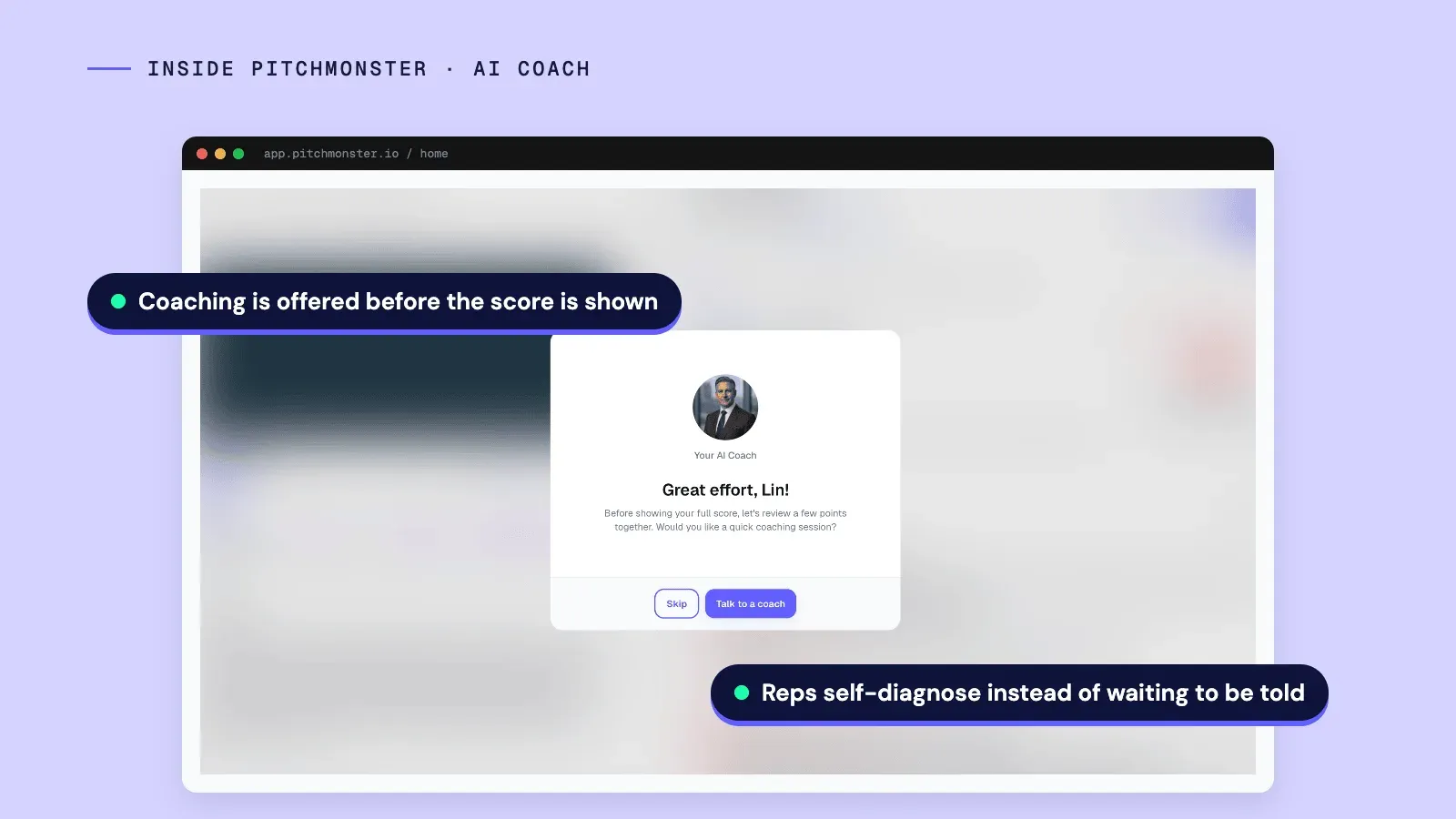
After each session, a Socratic AI Coach asks the rep what they noticed and what they would do differently, before the score is shown. It guides them to their own insight, so reps self-diagnose instead of nodding along to a manager's notes. Gong's Enable page describes a similar idea from the other direction: reps receive instant automated feedback and can ask its AI Coach follow-up questions after every session. The difference we can verify is the order, because PitchMonster's coach opens the conversation before the score appears.
PitchMonster and Gong Enable side by side
Gong sells AI role-play through Gong Enable, so a Gong customer can compare the two directly. The rows below use only what each vendor's own pages show (Gong's Enable page, checked October 2026).
Dimension |  PitchMonster PitchMonster |  Gong Gong |
|---|---|---|
Scenario source | A link, files, a CSV, an uploaded real call (Replicate) or Salesforce and Gong data (Connectors) | Past conversations (AI Trainer); Dry Run replicates the customer persona and account context for an upcoming meeting |
After a session | The AI Coach asks the rep what they noticed before the score is shown | Reps get instant automated feedback and can ask the AI Coach follow-up questions after every session |
Scorecard templates | MEDDIC / MEDDPICC, SPICED and Challenger templates | Not described on the Enable page |
Languages | 29 for role-plays | Not stated on the Enable page |
Data residency | EU data residency | Not stated on the Enable page |
Live capture and signals | Not offered: Live Call Analysis scores uploaded recordings | Gong captures calls, meetings and emails and flags deal signals. This row favors Gong |
A PitchMonster AI buyer tuned to your ICP

Reps practice against an AI buyer that behaves like the person they sell to. It stalls, raises pricing pushback, raises a skeptical stakeholder's concerns and changes its mind mid-conversation. The AI buyer adapts to each response across 4 difficulty levels (Easy, Medium, Hard and Insane). A new hire can start gentle, and a senior rep can take on a hostile, late-stage negotiation.
Because the buyer reacts to what the rep says, no two runs are identical. A rep can drill the same hard moment 10 times and get 10 realistic reps of it.
Build a PitchMonster scenario from a real call in about 2 minutes

A manager can build a role-play from a real call recording, a product doc or a website URL, without writing a script from scratch. Replicate rebuilds the buyer from an uploaded call or transcript, so a gap surfaced by your call coaching tool becomes a rehearsal the same afternoon. Managers can then fine-tune the scenario before assigning it.
PitchMonster scorecards on your own playbook

Every session is scored against a customizable scorecard, graded against the playbook, key phrases and standards you upload. PitchMonster ships with pre-made scorecard templates for MEDDIC / MEDDPICC, SPICED and Challenger, so a new team is not starting from a blank page. Managers get concise performance summaries and can spot skill gaps without sitting through each session, so coaching stays consistent as the team grows. The scoring is the same for every rep, which removes the guesswork from who is ready.
PitchMonster Live Call Analysis: scoring uploaded calls

PitchMonster's sales call analysis scores a real call you upload, against a scorecard you choose, using the same scorecards reps practice against. It works on recordings after the call ends and does not give a rep live prompts during a call. That is the honest scope: PitchMonster scores uploaded calls and rehearses the next one, and a real-time tool from this list covers the live call itself.
PitchMonster works with Gong and Salesforce

PitchMonster is designed to sit alongside your CRM, your enablement content and whatever call recorder you already run. It does not replace Gong or Salesloft. Gong and Salesforce can feed scenario creation, so the gaps your recorder surfaces become the next practice session, including for teams that also run Gong Enable. Webhooks also notify your own systems when a recording is completed and feedback is ready.
PitchMonster in 29 languages with EU data residency
Role-plays run in 29 languages, so global teams practice in the language they sell in. PitchMonster is a European company, with GDPR-ready data handling and EU data residency, which matters for regulated and cross-border sales orgs that cannot send call data just anywhere. The AI buyer and AI Coach are always available, so practice no longer waits on a manager's calendar. A new hire can run reps at 9pm the night before a big call.
PitchMonster privacy controls
Mandatory AI disclosure notices appear before recordings and on analysis screens, in line with EU AI Act transparency obligations. Admins can switch the leaderboard off to meet GDPR or company policy. A group hierarchy limits each user to the results in their own branch of the reporting structure. That answers the question reps ask first: who can see my scores?
PitchMonster readiness and team analytics
Learning and enablement leaders can report on readiness, not only on activity. Each role-play has a Performance view with the average score and the share of recordings and users at 80% or higher. A scorecard breakdown rated out of 5 by conversation stage shows which part of the call is weak. A workspace Analytics page adds recordings and practice minutes over a date range, with a per-user table of average score and 80%+ count.
Webhooks send an event to your own systems when a recording is completed and feedback is ready, so scores can flow into a CRM, BI tool or LMS. Role-plays stay in draft until the mandatory fields are complete, so half-built training never reaches reps, and enterprise teams can sign in with SAML SSO.
PitchMonster pricing
PitchMonster is sold by quote, with onboarding included and a dedicated CSM for larger teams. Trials are sales-led: you request a demo and we set your team up to try it. See the pricing page for how a quote works.
Where PitchMonster falls short
PitchMonster does not coach a live call as it happens. It is a practice layer, and call analysis works on recordings you upload, so teams that want in-call prompts need a real-time tool from this list. Trials are sales-led and the price is by quote, so there is no self-serve trial to start on your own. Scenario connectors cover Salesforce and Gong today, so teams on other CRMs or recorders build scenarios from a link, files, a CSV or an uploaded call instead.
Who PitchMonster is best for
Mid-market and enterprise revenue, enablement and learning teams that want reps to practice the hard moment before it costs a deal, alongside the call recorder they already own. Coaching style: practice and AI coaching, before the call. PRN Health Services reported 22.37% higher scores on actual calls over a 60-day window.
For enterprise proof, the Mentor Group case page also reports a 27% improvement in message delivery accuracy at Syngenta within 3 weeks, from an internal assessment. It also reports that Immersive cut onboarding from 10 weeks to 6. PitchMonster works best next to a call recorder, not instead of one.
2. Gong: post-call conversation intelligence for revenue teams

Gong is a revenue AI platform for teams that want call capture, analysis and forecasting in one system, and it now sells AI role-play through Gong Enable. It holds a 4.7 out of 5 rating on G2.
What is Gong?
Gong is a revenue AI platform that records and transcribes sales calls, meetings and emails, then analyzes them for topics, objections, competitor mentions and buying signals. Managers and reps get dashboards, scorecards and coaching recommendations. Its Gong Enable product adds AI role-play built from past calls and a pre-meeting practice mode (its own site, checked October 2026).
Gong also sells forecasting and sales engagement products on the same platform.
Gong key features
- Call, meeting and email capture with transcription
- AI analysis of topics, objections, competitor mentions and buying signals
- Dashboards, scorecards and coaching recommendations
- Deal-risk and buying-signal alerts
- Gong Enable: an AI Trainer that turns past calls into role-play scenarios, an AI Coach that reps can question after every session, and Dry Run for practicing an upcoming customer meeting
- Related products: Forecast and Engage
Gong pros
- Capture, coaching and forecasting sit on one platform
- Coaching comes from evidence in real conversations, not memory
- Practice can sit on the same platform: Gong Enable builds role-play scenarios from your own past conversations, per its page
- Gong's pricing page says integrating your existing tech stack is free
Gong cons
- Pricing is not published: you request a customized proposal through a form.
- Licenses are per user plus a platform fee, so budgeting needs a quote.
- Role-play and learning sit in a separate product, Gong Enable, so confirm in the quote what your package includes.
- Gong's Enable page does not state which languages AI Trainer, Dry Run or AI Coach support.
Gong pricing
No public price; sold by quote. Gong's pricing page says licenses are priced per user, with a platform fee based on the number of users supported. A customized proposal comes from a form with team-size bands from 1-50 to 10,000+ (checked October 2026). Our Gong pricing breakdown itemises what goes into a quote.
Who Gong is best for
Revenue teams running complex, multi-stakeholder deals that want call analysis, deal signals and forecasting in one platform, with a RevOps or enablement owner to act on the data. Coaching style: post-call analysis with real-time deal signals, plus AI role-play through Gong Enable. For a side-by-side, see our Gong alternative page.
3. Mindtickle: coaching plus certification for large enablement teams

Mindtickle is the right pick when you want coaching, training and certification unified for a big enablement motion, not a lightweight call reviewer. It holds a 4.7 out of 5 rating on G2.
What is Mindtickle?
Mindtickle is an AI-powered revenue enablement platform that folds call coaching into training and readiness. Its products include Sales Training, Coaching, Conversation Intelligence, Sales Content Management and an AI role-play simulator. Its conversation intelligence page says calls are analyzed and scored with AI, and managers coach on calls with embedded forms (its own site, checked October 2026).
Mindtickle key features
- Conversation intelligence that scores calls on talk time, pace and questions asked
- Coaching forms embedded on calls
- AI role-play with selectable voices and personas
- Readiness measurement through the Readiness Index
- Sales training and content management
Mindtickle pros
- Ties call coaching to training and readiness in one place
- AI role-play for practice, in 25+ languages per its role-play page
- Measures seller readiness alongside call scores
Mindtickle cons
- It is broader than a call reviewer, so teams that only want call scoring may not use the training modules.
- Pricing is not public, and the role-play page says there is no self-serve free trial, so you need a demo to size it.
Mindtickle pricing
No public price. Mindtickle's site shows no pricing page and routes to a demo request (checked October 2026). Our Mindtickle pricing review walks through what drives a quote.
Who Mindtickle is best for
Large enablement teams that want call coaching, training and certification in one system. Coaching style: post-call inside a training platform. For a comparison, see our Mindtickle alternative page.
4. Jiminny: conversation intelligence and coaching with a free trial

Jiminny is a conversation and revenue intelligence platform for mid-market B2B revenue teams that want call recording and coaching with a trial before they buy. It holds a 4.6 out of 5 rating on G2.
What is Jiminny?
Jiminny is a conversation and revenue intelligence platform that captures emails, phone calls and video calls and syncs insights to the CRM. Its homepage lists an AI Notetaker, call recording, transcription, sales coaching and an Ask Jiminny assistant. Its Scale plan is aimed at managers who coach every rep from real conversations (its own site, checked October 2026).
Jiminny key features
- Call and video recording with transcription
- AI Notetaker and Ask Jiminny assistant
- CRM sync of call insights
- 3 plans: Capture, Scale and Grow
- Recording, Insights and Listener seat types
Jiminny pros
- A 14-day free trial with no credit card lets you test it on real calls
- Jiminny says it charges no platform fee
- Listener seats give read-only access to transcripts and summaries
Jiminny cons
- Pricing is not published: the quote depends on seat count, seat type and plan.
- The minimum contract is 12 months, and there is a one-time setup fee.
Jiminny pricing
No public price. Jiminny's pricing page describes bespoke quotes across 3 plans (Capture, Scale and Grow) and 3 seat types. It states a 12-month minimum contract, no platform fee and a one-time setup fee, plus a 14-day free trial with no credit card (checked October 2026).
Who Jiminny is best for
Mid-market B2B teams that want conversation intelligence and coaching with a trial first. Coaching style: post-call coaching.
5. Balto: real-time guidance for contact centers and high-volume phone teams

Balto is built for contact-center and high-volume phone teams that want guidance during the live call. It holds a 4.8 out of 5 rating on G2.
What is Balto?
Balto is a real-time AI agent-assist and QA platform that connects to existing phone systems, listens to calls as they happen and guides agents with prompts. Its lineup is Agent Assist, Insights, QA and Togo, an AI voice agent for repeatable calls. Its site positions it for contact centers and phone-led teams (its own site, checked October 2026).
Balto key features
- Real-time guidance for agents during calls
- Automated QA, which Balto says scores 100% of interactions
- Insights across calls
- Togo AI voice agent for repeatable calls
- 60+ prebuilt integrations, per its FAQ
Balto pros
- Guidance reaches the agent while the call is live
- Scoring without manual listening, per the vendor
- Works with existing phone systems
Balto cons
- It is contact-center first, so it is not a sales role-play or practice tool.
- Pricing is not published, and the Togo agent is priced by the minute.
Balto pricing
No public price; sold by quote. Balto's pricing page says it is a single plan, Balto Plus, priced per seat. What you pay depends on team size and how you work, and its AI agent Togo is priced by the minute (checked October 2026).
Who Balto is best for
Contact-center, telesales and inside-sales teams that live on the dialer. Coaching style: real-time guidance, with automated scoring.
6. Allego: revenue enablement with coaching, learning and AI role-play

Allego is a fit for enablement teams that want coaching, learning and content in one platform. It holds a 4.6 out of 5 rating on G2.
What is Allego?
Allego is a revenue enablement platform with 5 products: Sales Content Management, Modern Learning, AI role-play and coaching, Digital Sales Rooms and Conversation Intelligence. Its conversation intelligence product captures and analyzes customer interactions to coach reps. Its AI role-play page lists 32 languages and 71 voices and accents, with scoring in 59 languages (its own site, checked October 2026).
Allego key features
- AI role-play and coaching with AI-driven scorecards
- Conversation intelligence across customer interactions
- Modern Learning and content management
- Scenarios such as objection handling, messaging rollouts and hot seat drills
- Digital Sales Rooms
Allego pros
- Coaching, learning and content in one hub
- AI role-play with a language count stated on the vendor's page
- AI capabilities and customer support are included in the price, per its pricing page
Allego cons
- It is broader than a focused call reviewer, so parts may go unused.
- Pricing needs a conversation, the typical contract is 3 years, and the pricing page mentions no free trial.
Allego pricing
No public price; sold by quote. Allego's pricing page says it prices per user per month, billed annually upfront. Price depends on seats and contract length: the typical contract is 3 years paid annually, with 2-year and 1-year options. AI capabilities and customer support are included (checked October 2026).
Who Allego is best for
Enablement teams that want coaching, learning and content together. Coaching style: post-call analysis, with AI role-play and content. For a comparison, see PitchMonster vs Allego.
7. Salesloft: conversation intelligence, now alongside Clari Copilot

Salesloft fits teams whose system of record is already Salesloft. It holds a 4.5 out of 5 rating on G2 (as of October 2026).
What is Salesloft?
Salesloft is a revenue platform covering sales engagement, conversation intelligence, deals and forecasting. Salesloft and Clari completed their merger on 2025-12-03 and operate as Clari + Salesloft, with Clari Copilot as the conversation intelligence product. The Conversations login still points to a Clari Copilot address, so the product lines are still being integrated (its own site, checked October 2026).
Salesloft key features
- Real-time AI guidance during calls to handle objections
- Battlecards that surface in real time on calls
- Automatic call scoring and AI call summaries
- Coachable moments that become tasks in rep workflows
- Clari Forecast and related revenue tools
Salesloft pros
- Coaching lives inside the daily workflow
- Real-time guidance and post-call summaries in one platform
- Clari's forecasting products now sit under the same company
Salesloft cons
- Value depends on already using Salesloft or Clari.
- Pricing is not public, and the merged product set is still being integrated, so confirm how Copilot is packaged before you compare it as a separate product.
Salesloft pricing
No public price; sold by quote. Salesloft's pricing page lists product modules with no prices or plan names and a Talk to sales button. Clari's old Copilot product page now redirects to Salesloft (checked October 2026).
Who Salesloft is best for
Teams that already run their sales motion in Salesloft or Clari and want conversation intelligence in the same system. Coaching style: both, real-time guidance and post-call summaries.
8. Chorus by ZoomInfo: conversation intelligence next to ZoomInfo data

Chorus fits teams already standardized on ZoomInfo that want conversation intelligence next to prospecting data. It holds a 4.5 out of 5 rating on G2.
What is Chorus by ZoomInfo?
Chorus is a conversation intelligence product owned by ZoomInfo, which announced the acquisition of Chorus.ai on 2021-07-13. Its product page describes capturing and analyzing customer calls, meetings and emails with transcriptions and insights, and tracking deal momentum and churn risk. It also brings ZoomInfo contact and company data into outreach (its own site, checked October 2026).
Chorus by ZoomInfo key features
- Call, meeting and email capture with transcription and insights
- Deal momentum and churn-risk tracking
- Win and loss insights and competitive insights
- Contact and communication sync to the CRM
- ZoomInfo contact and company data
Chorus by ZoomInfo pros
- Buyer and account context sits next to call data
- Coaching and ramp-time use cases are described on the product page
- Deep fit with ZoomInfo data
Chorus by ZoomInfo cons
- It is sold as a ZoomInfo product, so scope and price come from a ZoomInfo conversation.
- There is no standalone pricing page, only a Request Demo path.
Chorus by ZoomInfo pricing
No public price. ZoomInfo's Chorus page offers only a Request Demo path and lists no figure (checked October 2026).
Who Chorus by ZoomInfo is best for
Teams standardized on ZoomInfo that want conversation intelligence next to prospecting data. Coaching style: post-call analysis, with deal signals.
9. Salesforce Sales Cloud: coaching and conversation insights inside the CRM

Salesforce Sales Cloud fits teams that already run Salesforce and want coaching inside the CRM. It holds a 4.4 out of 5 rating on G2.
What is Salesforce Sales Cloud?
Salesforce Sales Cloud is a CRM with an in-CRM enablement product called Sales Programs. Sales Programs includes coaching, a Guidance Center, AI pitch feedback and conversation insights. Reps upload practice pitches that managers and peers score, and milestones can cover talk tracks and talk-listen ratios. Einstein Conversation Insights is listed as a separate product (its own site, checked October 2026).
Salesforce Sales Cloud key features
- Sales Programs with coaching guidance
- AI-powered pitch feedback scored by managers and peers
- Conversation insights and milestones
- Dashboards that identify coaching opportunities
- Agentforce for Sales as an add-on
Salesforce Sales Cloud pros
- Coaching sits next to deal records and account history
- Prices are published on Salesforce's own pages
- One system to administer for Salesforce shops
Salesforce Sales Cloud cons
- Sales Programs requires a Sales Cloud, Service Cloud or Platform license on top of its own price.
- Salesforce's pricing page does not say which Sales Cloud edition includes conversation insights, so confirm that with Salesforce.
Salesforce Sales Cloud pricing
Salesforce lists Sales Programs at $100 per user per month billed annually, and it requires a Sales Cloud, Service Cloud or Platform license. Sales Cloud edition prices run from $25 to $550 per user per month, and Agentforce for Sales is an add-on from $125 per user per month (checked October 2026). Salesforce says prices are subject to change.
Who Salesforce Sales Cloud is best for
Salesforce shops that want coaching and conversation insights inside the CRM. Coaching style: post-call analysis inside the CRM.
10. Avoma: AI meeting assistant with conversation intelligence add-ons

Avoma is an AI meeting assistant that adds conversation intelligence for teams that want call scoring and CRM updates at per-seat prices they can read. It holds a 4.6 out of 5 rating on G2.
What is Avoma?
Avoma is an AI meeting assistant with conversation and revenue intelligence add-ons. Its homepage lists meeting recording, speaker-identified transcription, AI notes, follow-up drafts and automatic CRM field updates. Its conversation intelligence features include AI call scoring against a playbook, smart trackers, real-time battlecards and AI sales coaching (its own site, checked October 2026).
Avoma key features
- Meeting recording and speaker-identified transcription
- AI call scoring against a playbook
- Smart trackers and real-time battlecards
- AI sales coaching and automatic CRM field updates
- Live transcription in 75+ languages, per its homepage
Avoma pros
- Plan prices are published per recorder seat
- Viewers and collaborators are free, per its pricing page
- Starts as a meeting assistant, so teams can add conversation intelligence later
Avoma cons
- Conversation Intelligence is a paid add-on on top of the plan price.
- The pricing page shows 2 different Organization figures ($24 and $29), so confirm the number before you budget.
Avoma pricing
Avoma publishes per recorder seat per month prices on annual billing: Startup $19, Organization $29 (a plan card shows $24) and Enterprise $39. Add-ons are priced per seat per month on annual billing: Conversation Intelligence $29, Revenue Intelligence $29 and Lead Router $19 (checked October 2026). The homepage offers a free trial.
Who Avoma is best for
Teams that want meeting notes, call scoring and CRM updates with prices they can read before a sales call. Coaching style: post-call, with real-time battlecards.
11. Revenue.io: real-time guidance and AI role-play for Salesforce teams

Revenue.io is a revenue platform that adds real-time guidance and AI role-play to a dialer and conversation intelligence, built for teams that run on Salesforce. It holds a 4.7 out of 5 rating on G2.
What is Revenue.io?
Revenue.io is a revenue platform that combines sales engagement, dialing, conversation intelligence, real-time guidance, coaching and AI. Its homepage lists real-time guidance (Moments), AI role-play and AI Scorecards under coaching. Its AI role-play page describes voice role-play with simulated buyers, scoring out of 100, a methodology score and 180+ prebuilt B2B SaaS scenarios (its own site, checked October 2026).
Revenue.io key features
- Real-time guidance through Moments
- AI Scorecards for calls
- AI role-play with simulated buyers and a score out of 100
- 180+ prebuilt B2B SaaS role-play scenarios
- Dialer and sequences in the same platform
Revenue.io pros
- Live guidance, call scoring and role-play in one platform
- AI role-play offers 100 free sessions to start, per its page
- Built for Salesforce teams, so CRM fit is a design goal
Revenue.io cons
- It is built around Salesforce, so teams on another CRM should check fit.
- The pricing page says a custom quote is built on a demo call, and the role-play page does not state languages beyond American-voice personas.
Revenue.io pricing
No public price; sold by quote. Revenue.io's pricing page names 3 plans (Activate, Engage and Orchestrate). It says a custom quote is built on the demo call rather than from a published list price (checked October 2026).
Who Revenue.io is best for
Salesforce-based teams that want live guidance, call scoring and role-play from one vendor. Coaching style: real-time guidance, with post-call scoring and practice. Revenue.io also competes with PitchMonster on role-play, and our PitchMonster vs Revenue.io page compares the two.
12. Dialpad: calling platform with real-time coaching for outbound teams

Dialpad is a business calling platform whose Sell product adds AI coaching for outbound teams. It holds a 4.4 out of 5 rating on G2.
What is Dialpad?
Dialpad is an AI-powered business communications and contact-center platform, and Dialpad Sell is its outbound sales calling product. Its Sell page describes real-time coaching, AI Playbooks, automatic scoring of 100% of calls against your criteria and summaries with next steps. It says it syncs with Salesforce and HubSpot (its own site, checked October 2026).
Dialpad key features
- Real-time coaching and AI Playbooks during calls
- Automatic call scoring against your criteria
- Automatic call summaries with next steps
- Salesforce and HubSpot sync
- Calling and AI in one platform
Dialpad pros
- Coaching comes with the calling platform, so reps stay in one tool
- Plan prices are published per user per month
- Scores every call against criteria you set, per its Sell page
Dialpad cons
- Coaching comes with Dialpad calling, so teams on another dialer would need to move.
- The Sell page does not say which plans include live coaching or which languages the AI supports.
Dialpad pricing
Dialpad publishes Sell plans at $39 (Essentials), $59 (Advanced) and $79 (Premium) per user per month. The pricing toggle does not label whether the shown figure is monthly or annual. Premium Sell is annual-only, and the FAQ says prices vary by region and currency (checked October 2026). The site also offers a Try free button.
Who Dialpad is best for
Outbound calling teams that want coaching inside the calling platform. Coaching style: real-time coaching, with post-call scoring.
13. Outreach: Kaia live call cards for teams on Outreach

Outreach is a revenue platform whose Kaia product brings live call cards and conversation intelligence to teams that already run Outreach. It holds a 4.3 out of 5 rating on G2.
What is Outreach?
Outreach is an agentic AI platform for revenue teams, covering prospecting, deal execution, conversation intelligence, coaching and forecasting. Kaia is its conversation intelligence product: it joins and records live meetings, transcribes in real time and shows live content cards and battlecards. It then writes summaries and action items and can auto-update CRM fields (its own site, checked October 2026).
Outreach key features
- Live meeting recording and real-time transcription
- Live content cards and battlecards during calls
- Meeting summaries, action items and follow-ups
- Automatic CRM field updates
- Kaia Playlists that share strong calls for coaching
Outreach pros
- Live cards show reps the right content during the call
- Coaching playlists reuse strong calls
- Sits next to Outreach sequences and deal tools
Outreach cons
- Value assumes you already run Outreach.
- Pricing is credit-based and unpublished: packages come with AI credit allowances and no dollar amounts.
Outreach pricing
No public price; sold by quote. Outreach's pricing page lists 4 packages (Amplify Essentials with 10,000 AI credits, Core 25,000, Plus 50,000 and Pro 100,000). Each shows Request pricing and no dollar amounts (checked October 2026).
Who Outreach is best for
Teams already running Outreach that want live call cards and conversation intelligence in the same platform. Coaching style: real-time cards, with post-call summaries.
14. HubSpot Sales Hub: call recording and coaching inside HubSpot CRM

HubSpot Sales Hub fits teams on HubSpot CRM that want call recording and coaching in the same system. It holds a 4.4 out of 5 rating on G2.
What is HubSpot Sales Hub?
HubSpot Sales Hub is a sales CRM suite with sequences, meetings, pipelines, call tools and AI credits. Its Sales Hub page lists "record and transcribe calls" under the Professional plan and says conversation intelligence brings the voice of the customer into your CRM for better coaching. It also describes a HubSpot Notetaker for meetings (its own site, checked October 2026).
HubSpot Sales Hub key features
- Call recording and transcription on the Professional plan
- Conversation intelligence inside the CRM
- HubSpot Notetaker for meetings
- Sales analytics dashboards and forecasting
- Sequences, meetings and pipelines
HubSpot Sales Hub pros
- Call data lives in the CRM you already use
- A free plan is available for up to 2 users
- Plan prices are published per seat
HubSpot Sales Hub cons
- The Sales Hub page describes coaching in general terms and does not detail conversation intelligence features or which plans include them.
- Professional and Enterprise add one-time onboarding fees ($1,500 and $3,500) on top of the seat price.
HubSpot Sales Hub pricing
HubSpot lists a Free plan for up to 2 users, Starter at $7 to $20, Professional at $90 to $100 and Enterprise from $150 per seat per month. The page does not label which figure is monthly or annual billing. Professional adds a one-time $1,500 onboarding fee and Enterprise a one-time $3,500 fee (checked October 2026).
Who HubSpot Sales Hub is best for
Teams on HubSpot CRM that want call recording and coaching in the same system. Coaching style: post-call, inside the CRM.
15. Attention: botless recording, scorecards and AI agents

Attention is a conversation intelligence platform that records without a bot, scores calls and drafts next steps with AI agents. It holds a 4.6 out of 5 rating on G2.
What is Attention?
Attention is a conversation intelligence and AI sales agent platform. Its homepage says it captures meetings, emails and sales interactions and drafts the next move on each deal. It records without a bot, offers consent workflows and grades every call with AI Scorecards against MEDDIC, BANT or a custom framework (its own site, checked October 2026).
Attention key features
- Botless recording with admin controls and consent workflows
- AI Scorecards for MEDDIC, BANT or a custom framework
- Agents that draft next moves for the rep to approve
- CRM auto-update and deal-health forecasting
- An MCP server with 70+ read and write tools
Attention pros
- Scores calls against named sales frameworks
- Botless recording avoids a visible bot in the meeting
- 200+ integrations, per its homepage
Attention cons
- No pricing is published: the pricing page returns a 404.
- Its focus is agents that automate CRM work, so coaching and practice are one part of a wider platform.
Attention pricing
Not published. Attention's site shows no pricing page and routes to Get Started (checked October 2026).
Who Attention is best for
Teams that want botless recording, framework-based scorecards and agents that keep the CRM current. Coaching style: post-call scorecards, with AI agents.
16. Modjo: French call recording, scoring and CRM filling

Modjo is a European AI platform for revenue teams that records calls, scores them and fills the CRM. It holds a 4.7 out of 5 rating on G2.
What is Modjo?
Modjo is a French AI platform for revenue teams that records and transcribes sales calls, updates CRM records and surfaces deal signals. Its products include AI Sales Agent, AI CRM Filling and AI Call Scoring. It states transcription in 100+ languages, hosting in France on the AWS Paris region and GDPR compliance (its own site, checked October 2026).
Modjo key features
- Call recording and transcription in 100+ languages
- AI Call Scoring
- AI CRM Filling
- Call summaries and email follow-ups
- Modjo Deals and an MCP server
Modjo pros
- EU data hosting in France
- Call scoring and CRM filling in one product
- Unlimited listener licenses for managers, per its pricing page
Modjo cons
- Pricing is not published: the pricing page shows a licence-count form and no prices.
- The site interface is English and French, and the pricing page says Modjo is optimal from 3 sales reps.
Modjo pricing
No public price; sold by quote. Modjo's pricing page bases price on the number of recording licenses, states unlimited listener licenses for managers and shows a licence-count form instead of prices (checked October 2026).
Who Modjo is best for
Revenue teams, including European ones, that want call scoring and CRM filling with EU hosting. Coaching style: post-call scoring.
17. Claap: call recorder with scoring, a free plan and CRM auto-complete

Claap is an AI meeting and call recorder with revenue agents, for teams that want to start on a free plan. It holds a 4.6 out of 5 rating on G2.
What is Claap?
Claap is an AI meeting and call recorder with revenue agents that auto-complete the CRM, score calls and forecast deals. Calls can be scored against MEDDIC, MEDDPICC, BANT and SPICED or custom criteria. Claap's site shows "by lemlist", and its CEO's post dated 20 Oct 2025 is titled "Claap is joining lemlist" (its own site, checked October 2026).
Claap key features
- Recording of online meetings, calls, VoIP and emails
- Scoring against MEDDIC, MEDDPICC, BANT, SPICED or custom criteria
- CRM auto-complete and deal insights
- Recording with a visible bot or without one
- Writes to Salesforce and HubSpot
Claap pros
- A free Basic plan
- Plan prices are published per licence
- Claap states it does not use customer data to train models
Claap cons
- ClaapAgent, AI Coaching and Deal Insights sit in the Business plan.
- Claap announced it is joining lemlist, so check the roadmap with the vendor.
Claap pricing
Claap lists a free Basic plan, Pro at $40 per licence per month ($32 on yearly billing), Business at $75 ($60 yearly) and Enterprise by quote. Prices appear in EUR and USD, and yearly billing is 20% less (checked October 2026).
Who Claap is best for
Teams that want a recorder with framework scoring and a free plan to start. Coaching style: post-call scoring and coaching.
18. Convin: AI agents and quality management for B2C contact centers

Convin is an AI agent platform built for B2C businesses and contact centers rather than B2B sales teams. It holds a 4.7 out of 5 rating on G2.
What is Convin?
Convin is an AI agent platform for customer conversations, aimed at B2C businesses. Its products include an AI Phone Call Agent, a Real-Time Assist Agent, a Conversation Intelligence Agent, Convin LMS and Quality Management Software. Deployment can be on-prem, in your cloud or in Convin's private cloud (its own site, checked October 2026).
Convin key features
- Real-Time Assist Agent
- Conversation Intelligence Agent
- Quality Management Software
- Convin LMS for agent training
- On-prem, client cloud or private cloud deployment
Convin pros
- Real-time assist and QA in one platform
- Flexible deployment options
- Built-in LMS for agent training
Convin cons
- It is built for B2C contact-center work, so complex B2B sales teams are a weaker fit.
- Pricing is custom, and the pricing page labels a Quality Management module free without further detail.
Convin pricing
No public price; sold by quote. Convin's pricing page shows Customized Plans with no prices and routes to Book a Demo (checked October 2026).
Who Convin is best for
B2C contact centers that want real-time assist and QA. Coaching style: real-time assist, with QA scoring.
19. Salesken: QA scoring and live in-call prompts for sales and support

Salesken is a conversation intelligence platform for sales and support teams that combines QA scoring with live in-call prompts. It holds a 4.9 out of 5 rating on G2.
What is Salesken?
Salesken is a conversation intelligence platform for sales and support teams. Its product lines are Quality Assurance AI, an AI Sales Assistant that gives live in-call prompts, Revenue Intelligence AI, a Notetaker and Field Sales Analytics. Salesken says its Quality Assurance AI evaluates 100% of conversations (its own site, checked October 2026).
Salesken key features
- Live in-call prompts from the AI Sales Assistant
- Quality Assurance AI that evaluates conversations
- Revenue Intelligence AI
- Notetaker for meetings
- Field Sales Analytics
Salesken pros
- Live prompts and QA scoring in one vendor
- Modular product lines, so teams can start with one
- A request-pricing page for each product line
Salesken cons
- Pricing is not published: every plan shows Request Pricing.
- The 100% evaluation figure is Salesken's own claim, so test it on your calls.
Salesken pricing
No public price; sold by quote. Salesken's pricing page shows Request Pricing for each plan and says licences are priced per recorded user plus a platform fee based on platform users (checked October 2026).
Who Salesken is best for
Sales and support teams that want QA scoring and live prompts. Coaching style: real-time prompts, with QA scoring.
Practice tools to pair with call coaching software
Practice tools let a rep rehearse a call with an AI buyer before the real conversation, which most call recorders do not offer. Hyperbound and Second Nature are 2 practice-first tools that teams pair with a call recorder. Gong (through Gong Enable), Revenue.io, Mindtickle and Allego also offer AI role-play inside wider products.
Hyperbound: self-serve outbound and cold-call practice

Hyperbound is an AI role-play platform for SDR teams that want fast, self-directed AI role-plays for sales training. The AI plays a prospect and responds to the rep in real time, so reps get volume practice before they dial a real list. It holds a 4.9 out of 5 rating on G2.
Its pricing page lists a free plan with 45 prebuilt AI role-plays, plus Practice and Perform plans. Perform adds real call scoring, deal coaching, CRM intelligence and conversation intelligence, with separate per-user licenses and no published prices (checked October 2026). Its FAQ states support for 25+ languages.
Practice builds confidence through repetition, while analysis of real calls sits in the separate Perform license. For a deeper side-by-side, see our Hyperbound alternative comparison.
Second Nature: conversational AI practice for large teams

Second Nature is an AI role-play platform where a conversational AI "virtual pitch partner" scores reps' practice conversations and helps them improve. It holds a 4.6 out of 5 rating on G2. Its homepage shows 30+ languages, 24/7 access and a Deal Coach module for coaching on live deals, and says it integrates with any LMS via SCORM or LTI. It publishes no price: the site has a Get a demo form and a Try Now sample role-play (checked October 2026). Large teams that want consistent, scored practice at scale are its natural fit.
For a direct comparison, see PitchMonster vs Second Nature.
8 more call coaching and conversation tools worth knowing
These 8 tools are narrower or sit outside the main B2B sales use case, so they get a short entry. Each fact below comes from the vendor's own site, checked October 2026.
Tool | What it is | Best for | Pricing on the vendor's site |
|---|---|---|---|
Cresta | AI platform for contact centers: agent assist, conversation intelligence and quality management | Contact-center teams | No public price; demo request only |
Observe.AI | Contact-center CX platform with AI agents, real-time agent assist, QA and coaching | Contact centers, not sales role-play | Custom, based on deployment scope |
CallMiner | Eureka platform with record, analyze, coach and real-time modules for contact centers | Contact centers that need compliance and QA | No pricing page; demos |
Sybill | Records calls, meetings, emails and Slack threads, auto-updates CRM fields and drafts follow-ups | Reps who want CRM updates after each call | Pricing page without figures on the homepage; 14-day free trial |
Momentum | Captures customer interactions, with a Coaching Agent and an AI coaching score | Teams that want deal signals and CRM updates | No figures on the homepage; its site says it is now part of Salesforce |
Fathom | AI notetaker with summaries; the Business plan adds coaching metrics and AI scorecards | Reps who want free recording and summaries | Free plan; paid Premium, Team and Business plans per user |
Otter | Meeting transcription with CRM sync and an Otter Sales Notetaker on Enterprise | Teams that need transcripts and follow-ups | Free Basic plan; Pro and Business per user; Enterprise by demo |
Fireflies | Meeting notes with conversation intelligence, topic trackers and talk-time analytics | Teams that want notes plus basic trackers | Free, Pro, Business and Enterprise plans |
Cresta, Observe.AI and CallMiner are built for contact-center agent teams, so they matter if your reps work queues. Sybill and Momentum focus on CRM updates and deal signals. Fathom, Otter and Fireflies start from meeting notes, so they cover recording and summaries before coaching. Check Momentum's ownership and packaging with the vendor, because its site and the announcement it links to describe the Salesforce deal at different stages.
Call coaching software pricing compared
Tool | Pricing model | Published price | Free plan or trial | Checked on |
|---|---|---|---|---|
PitchMonster | Quote-based; onboarding included, dedicated CSM for larger teams | By quote | Trials are sales-led: request a demo | October 2026 |
Gong | Per user license plus a platform fee; custom proposal | Not published | Not stated | October 2026 |
Mindtickle | Demo request | Not published | Not stated; no self-serve trial for role-play | October 2026 |
Jiminny | Bespoke by plan (Capture, Scale, Grow) and seat type; 12-month minimum | Not published | 14-day free trial, no credit card | October 2026 |
Balto | Per seat on a single plan (Balto Plus); quote | Not published | Not stated | October 2026 |
Allego | Per user per month, billed annually; typically a 3-year term | Not published | Not stated | October 2026 |
Salesloft | Talk to sales | Not published | Not stated | October 2026 |
Chorus by ZoomInfo | Demo request through ZoomInfo | Not published | Not stated | October 2026 |
Salesforce Sales Cloud | Per user per month; Sales Programs needs a Sales Cloud, Service Cloud or Platform license | Sales Programs $100; CRM editions $25 to $550 per user per month | Not stated for coaching | October 2026 |
Avoma | Per recorder seat per month, plus add-ons | $19 to $39 per recorder; CI add-on $29 (annual) | Free trial offered on the site | October 2026 |
Revenue.io | Quote built on a demo call | Not published | 100 free AI role-play sessions | October 2026 |
Dialpad | Per user per month by plan | Sell $39, $59 and $79 | Try free offered on the site | October 2026 |
Outreach | AI credit packages; request pricing | Not published | Not stated | October 2026 |
HubSpot Sales Hub | Per seat by plan, plus one-time onboarding fees on Professional and Enterprise | Starter $7 to $20, Professional $90 to $100, Enterprise from $150 per seat per month | Free plan for up to 2 users | October 2026 |
Attention | Not stated | Not published | Not stated | October 2026 |
Modjo | Per recording license; unlimited listener licenses | Not published | Not stated | October 2026 |
Claap | Per licence per month; yearly billing 20% less | Pro $32 and Business $60 (yearly); Enterprise by quote | Free Basic plan | October 2026 |
Convin | Customized plans | Not published | Not stated | October 2026 |
Salesken | Per recorded user plus a platform fee; request pricing | Not published | Not stated | October 2026 |
How to choose the right call coaching software
Choosing call coaching software starts with when you want coaching to happen: before the call, during it or after it. Pick that timing first, then check CRM and dialer fit, analysis depth and whether the tool helps a rep fix the skill. The rules below recommend the tool that fits, whoever makes it:
- If your reps are on the phone all day at volume, start with Balto, Revenue.io or Salesken for live prompts. Add a practice layer like PitchMonster to drill the cold-call opener and first objection before the dial.
- If you run complex, multi-stakeholder deals with a RevOps function, start with Gong or Chorus by ZoomInfo.
- If certification and structured training matter as much as call review, start with Mindtickle or Allego.
- If you want conversation intelligence in a mid-market team with a trial first, start with Jiminny, which offers a 14-day free trial.
- If you want published per-seat prices or a free plan, look at Avoma, Claap, HubSpot Sales Hub or Dialpad.
- If your team already runs Salesloft, Clari, Outreach, ZoomInfo, Dialpad, HubSpot or Salesforce, check the coaching module in the stack you own first.
- If you run a contact-center queue, look at Balto, Convin, Cresta, Observe.AI and CallMiner, which are built for agent queues and QA.
- If you want reps to fix the gap before it costs a deal, start with PitchMonster and pair it with a call recorder.
- Remote and global teams need coaching that does not depend on being in the same room. Asynchronous review plus always-on practice in 29 languages (PitchMonster) keeps coaching consistent across time zones.
Match the tool to where your deals break. This table sorts the usual failures into the lane that fixes them.
Failure | Where you lose deals | Start with |
|---|---|---|
Price pushback | Reps freeze when a buyer pushes back on price | Practice: objection drills against an AI buyer, plus a coach that makes them reflect |
Slow ramp | New hires take months to sound credible | Practice: repeat real scenarios until the response holds, from week one |
No visibility | Managers coach on gut feel, not evidence | Analysis: score real calls and review the patterns |
Confidence gap | Reps sound fine solo but fall apart live | Practice first, then analysis to confirm it shows up on real calls |
No habit | A strong framework changes nothing on calls | Practice on a weekly cadence with a scored rubric |
Once you have a shortlist, run it through 5 checks before you sign.
Even the best tool does not change anything on its own. Weigh the checks against the reviews above, then match the tool to the team you run, not the demo you just watched.
Common mistakes when choosing
- Chasing flashy features over workflow fit is the first mistake. A wall of metrics impresses in a demo, but if reps have to leave their CRM or dialer, adoption drops fast.
- Treating the tool as manager-only reporting backfires. When reps see surveillance rather than support, they disengage, so involve a few reps early.
- Starting with too many metrics is a common trap. Begin with one or two behaviors and add more once those stick. Poor CRM integration is a related trap, since it pushes manual entry back onto reps.
- Over-relying on AI scores is risky, because AI can penalize a rep who reads the room and adapts. Pair automated scores with human review.
- Treating coaching as an event changes little. A workshop without repeated practice on realistic calls collapses the moment a buyer pushes back, even with a strong objection-handling framework.
- Buying a tool and never tracking use is where most programs quietly die. Put completion on a dashboard from week one.
- Coaching off generic content misses the specific objections your team loses to, so build scenarios from your own calls.
Shortlist 2 or 3 tools from the lane that fits, then test them on your own calls before you sign.
What is call coaching software?
Call coaching software, often called sales call coaching software, records and transcribes calls, then uses AI to analyze what happened so managers and reps can coach on real conversations. It tracks signals like talk-to-listen ratio, question frequency, sentiment shifts and keyword triggers, then turns them into scorecards and coaching notes a manager can act on.
The point is scale. A manager cannot sit in on every call, so the software reviews all of them and surfaces the few that need attention. That frees a manager to coach the middle of the team, and it cuts admin, because transcription, summaries and CRM updates happen automatically.
What is conversation intelligence software?
Conversation intelligence software records sales calls and meetings, transcribes them and uses AI to analyze what was said. It tags topics, objections, competitor mentions and sentiment, scores talk-to-listen ratio and writes summaries to the CRM. Call coaching is what a manager does with that analysis, so the 2 terms often describe the same tool.
Conversation intelligence is the engine that reads the call, and call coaching is the workflow built on top of it. Gong, Chorus, Jiminny, Avoma, Attention and Modjo sell the engine; Mindtickle, Allego, Salesloft and Outreach bundle it into wider platforms. In contact centers, vendors such as CallMiner and Observe.AI sell the same capture-and-analyze idea together with quality management and agent assist.
How to coach sales calls with AI
Coaching sales calls with AI follows the same 3 steps in most conversation intelligence platforms. The software captures and transcribes the call, tags the moments that matter, then scores the conversation against a playbook. The steps below show what each one does, and where a practice layer adds what most recorders skip.
First, the software captures and transcribes the call, producing a searchable transcript within minutes. Second, it tags the moments that matter. Tools like Gong flag a competitor mention, a pricing objection or a long rep monologue, so a manager can jump straight to the 90 seconds where a deal turned. Third, it scores the conversation against a playbook, reading talk-to-listen ratio, question count and sentiment, then rolling those into a scorecard.
The catch is timing. In most tools every step happens after the call ends, so the rep already lived the mistake and the fix arrives one deal late.
Recording consent and AI disclosure
Recording a sales call can require consent, and the rules differ by country and, in the US, by state. Before you buy, check how each tool announces recording, whether it joins with a visible bot or records without one, and what notice reps and buyers see. This is not legal advice, so ask your counsel.
The EU AI Act also sets transparency obligations for AI systems that interact with people, which matters for AI role-play buyers. Vendors handle it differently, using their own wording. Outreach says Kaia records only the seller's side. Attention lists admin controls and consent workflows with botless recording. Claap records with a visible bot or without one.
PitchMonster shows AI disclosure notices before recordings and on analysis screens, and admins can switch the leaderboard off. Modjo hosts data in France on the AWS Paris region.
How each delivery mode reaches the rep
The table below uses each vendor's own wording where it describes how guidance or scoring reaches the rep. We found no latency figure for live prompts on the vendor pages we read, so that column is left out rather than guessed. "Not stated by the vendor" means the pages we read do not say.
Tool | Delivery mode | Channels | CRM link | Consent or disclosure |
|---|---|---|---|---|
PitchMonster | Post-session scorecard and AI Coach; Live Call Analysis scores uploaded recordings, no live prompts | Practice sessions and uploaded audio or video files | Gong and Salesforce connectors build scenarios; webhooks send results onward | AI disclosure notices before recordings and on analysis screens |
Balto | Real-time guidance for agents during calls | Connects to existing phone systems | 60+ prebuilt integrations, per its FAQ | Not stated by the vendor |
Revenue.io | Real-time guidance (Moments) | Dialer and conversation platform | Built for Salesforce teams | Not stated by the vendor |
Salesloft | Real-time AI guidance and battlecards during calls; call summaries after | Salesloft platform | Not stated by the vendor | Not stated by the vendor |
Outreach | Live content cards and battlecards during meetings; summaries after | Joins and records live meetings | Can auto-update CRM fields | Records only the seller's side, which the vendor presents as supporting compliance |
Dialpad | Real-time coaching and playbooks; call scoring after | Dialpad calling | Syncs with Salesforce and HubSpot | Not stated by the vendor |
Salesken | Live in-call prompts (AI Sales Assistant); QA scoring | Not stated by the vendor | Not stated by the vendor | Not stated by the vendor |
Gong | Post-call scoring and coaching; deal signals; AI role-play and Dry Run through Gong Enable | Calls, meetings, emails and practice sessions | Integrations listed; connecting your stack is free per its pricing page | Not stated by the vendor |
Attention | Post-call scorecards and agents that draft next steps | Botless recording across major meeting platforms | Auto-updates the CRM; 200+ integrations | Admin controls and consent workflows |
Claap | Post-call scoring and coaching | Records with a visible bot or without one | Writes to Salesforce and HubSpot | Visible-bot option; GDPR compliance stated |
How to build a call coaching program: cadence, rubric and roles
Call coaching programs succeed on cadence, not on the software purchase. Start with 1 or 2 behaviors, set a weekly practice target and a monthly call review, write 1 shared rubric and name who owns what. A few reps in early and a human in the loop keep it honest.
- Pick the 1 or 2 metrics that move deals, like objection handling or discovery quality, and coach those until they become habit instead of starting with 20.
- Bring a few reps into the trial and let them see the analysis on their own calls, because adoption follows trust.
- Build a certification checkpoint: reps hit a readiness benchmark, in a role-play or a scored live call, before they own a territory or a new product line.
- When a manager surfaces a gap in the call data, assign a role-play so the rep drills that exact moment against an AI buyer instead of a live prospect. That is how you pair analysis with practice.
- A short weekly review of a handful of flagged calls beats an automated grade nobody discusses, so combine AI scores with human judgment.
Give every rep a weekly target of completed practice sessions. A realistic floor is 2 to 3 sessions, protected on the calendar so pipeline work does not cut it. Pair that with a monthly call review, where a manager scores one or two real calls per rep against the same rubric the practice uses. Run the first cycle with a small group, then widen it once the habit holds.
Write the rubric before you score anything

A workable scorecard rates a handful of dimensions on every call.
- Discovery: did the rep uncover the real problem and the cost of inaction?
- Objection handling: did they acknowledge the concern before answering it?
- Talk-to-listen ratio: is the buyer doing enough of the talking?
- Next step: did the rep secure a specific, dated commitment?
- Filler and pacing: is the delivery clear and controlled under pressure?
Keep the same rubric for practice and for live-call review. A rep then sees one consistent standard instead of a different opinion from each coach.
Assign the roles
Reps own their weekly practice and their own reflection on what they would change. Managers own the monthly review and the coaching conversation, using the 70/30 rule so the rep does most of the talking. Enablement or RevOps owns the rubric, the scenario library and the dashboard that tracks completion and scores.
If your team is structured this way, our sales enablement solution shows how the pieces connect. Track a short list of metrics so you can prove the program works, and add the outcome numbers leadership cares about, win rate and ramp time. If practice completion climbs but win rate does not move, the scenarios are wrong, so fix the content rather than pushing harder on volume.
Where practice fits
Most call recorders on this list analyze calls that already happened, so a rep learns a lesson on a live deal. The recording shows what went wrong but cannot give the deal back. A practice layer closes that gap: PitchMonster is built as that layer, and Gong, Mindtickle, Allego and Revenue.io also sell AI role-play inside wider platforms.
The two layers work together. Record real calls with Gong or Chorus to find the skill gap, then drill that exact moment in PitchMonster against an AI buyer, 10 times if needed. JustSchool reported +8.3% new-hire conversion.
10 reps of one hard moment in an afternoon beat one team role-play a quarter. More practice platforms are in our comparison of top sales training tools, roundup of sales coaching programs, guide to the best AI sales software and top role-play tools comparison.
Want to turn the gaps your call coaching software surfaces into reps who close them?
Book a 15-minute demo and we will build your first AI role-play scenario with you, scored on your playbook every time. Book a demo.
Frequently asked questions
What is the best call coaching software?
The best call coaching software is the tool that fits when you want coaching to happen: before, during or after the call. PitchMonster is our pick for practicing the call before it happens, Gong for post-call analysis at scale, and Balto for real-time guidance on contact-center and high-volume phone teams.
What is the best call center coaching software?
The best call center coaching software is built for agent queues. Balto, Convin, Cresta, Observe.AI and CallMiner offer real-time assist and quality management, per their own sites. B2B sales teams that sell complex deals usually look at Gong, Jiminny or Salesloft instead. Pick by whether you coach agents on queues or reps on multi-call deals.
What is call coaching software?
Call coaching software records, transcribes and analyzes sales calls so managers and reps can see what worked and what missed. It uses AI to read signals like talk-to-listen ratio, question frequency and objection handling, then turns hours of recordings into a few reviewable scorecards. Most tools also write summaries back to the CRM.
What is the difference between real-time and post-call coaching?
The difference between real-time and post-call coaching is timing. Real-time coaching surfaces prompts, battlecards and objection responses while the call is live. Post-call coaching analyzes the recording afterward, scoring the conversation and surfacing patterns across calls. Real-time suits high-volume phone teams, and post-call suits complex deals owned by a manager. Many teams run both.
What is the difference between call practice and call analysis?
The difference between call practice and call analysis is when the learning happens. Practice tools, like PitchMonster or Hyperbound, let a rep rehearse with an AI buyer before the real call. Analysis tools record and score calls that already happened, and some platforms, like Gong with Gong Enable, now sell both. Practice builds skill before a deal is at stake.
How much does call coaching software cost?
Call coaching software costs anything from free plans to quote-only contracts. Claap and HubSpot list free plans. Avoma lists $19 to $39 per recorder per month, Dialpad Sell $39 to $79 per user per month and Salesforce Sales Programs $100 per user per month. Most other tools on this list publish no price (vendor sites, checked October 2026).
Is AI call coaching software worth it?
AI call coaching software is worth it for most teams past a handful of reps. A manager cannot review every call, so AI reviews all of them and surfaces the few that need attention. The value depends on adoption, so pick a tool that syncs with your CRM, coach 1 or 2 behaviors at a time and add practice.
Does call coaching software replace sales role-play?
No, call coaching software does not replace sales role-play on its own. It analyzes calls that already happened, so a rep learns on a live deal. AI role-play lets reps rehearse the same hard moment before it costs a deal, from a practice tool like PitchMonster or a platform add-on like Gong Enable. Pair your recorder with a practice layer.
What is the best call coaching software for small teams?
For small teams, Jiminny is a common pick for call coaching software, and its 14-day free trial lets you test it on real calls. Claap and HubSpot list free plans. PitchMonster is built for mid-market and enterprise teams, so a very small team may start with a call recorder and add a practice layer later.
PitchMonster vs Gong: which do I need?
PitchMonster and Gong overlap more than they used to, and many teams run both. Gong captures real calls, and its Gong Enable product adds AI role-play from past calls. PitchMonster is built around practice. Its AI Coach asks before the score, scenarios can come from Gong or Salesforce data, and role-plays run in 29 languages with EU data residency.
The bottom line
Pick by when you want coaching to happen. PitchMonster is our first pick for practicing the call before it happens. Gong fits post-call intelligence for revenue teams with a RevOps owner, and Balto fits real-time guidance for phone-heavy teams. Mindtickle fits when training matters most, and Jiminny fits a mid-market team that wants a trial first.
Analysis finds the gap and practice closes it, so most teams need both. Book a demo and we will build your first scenario live from one of your real calls.