Last updated: 2026-11-02
AI tools for learning and development can support authoring, video, delivery, reinforcement, skills operations and practice. This guide to L&D AI tools covers 17 tools across those 6 jobs, with G2 scores, published prices and standards checked in October 2026.
Shortlist
This list is grouped by job, and the practice group comes first. These 3 lead our picks for practice, authoring and delivery; Synthesia is our pick for avatar video.
Tool | Best for | Why it made the top 3 |
|---|---|---|
PitchMonster | Scored practice of customer-facing conversations | AI buyers, an AI Coach before the score, scorecards and adoption analytics |
Articulate 360 | Building AI-assisted courses | Authoring, review, localization and a built-in LMS in one suite |
Docebo | An enterprise LMS with skills and AI | Learning, skills intelligence, knowledge search and AI agents |
Our picks weigh suite breadth and enterprise fit as well as the 4 published-facts scores in "How we evaluated". A pick can therefore score below a peer in its own group.
Why listen to us?
This comparison was written by Oleg Bolotnov, founder and CEO of PitchMonster. He spent 9 years in sales roles before founding the company, and earlier built Gradual.io, a sales LMS for growing businesses without in-house coaches.
PitchMonster launched in 2022 and builds AI role-play and coaching for customer-facing teams. It holds 4.9 out of 5 on G2, checked October 2026. Public case-study pages feature Mentor Group, PRN Health Services, SThree and JustSchool.
We rank ourselves first, so every competitor fact below comes from public sources checked in October 2026.
The 17 best AI tools for L&D teams compared
This table compares the tools by job, with the AI features each vendor names, its published price and its G2 score.
Tool | Best for | AI features as published | Published price | G2 score |
|---|---|---|---|---|
PitchMonster | Scored AI role-play for customer-facing teams | AI buyers, AI Coach and scorecards | By quote | 4.9 |
Second Nature | Conversational AI role-play with LMS links | AI pitch partner and Deal Coach | Not published; by quote | 4.6 |
ELB Learning Rehearsal | Video practice and AI role-play | Mentor AI feedback and AI role-play avatars | From $5,268 per year for Rehearsal; AI role-play is a separate, higher price; all US prices | 4.6 |
Yoodli | Communication coaching with AI role-play | Role-plays, Personas and Coach modules | Pro $8 monthly, billed annually; teams by quote | 4.8 |
Articulate 360 | AI-assisted course authoring | AI Assistant and Nova AI agent | Frontline from $500 per year; Teams $1,749 per seat per year | 4.7 |
Mindsmith | Interactive courses from source material | Builds courses from source files | Free; Professional $39 per author monthly, billed annually | 4.8 |
Coursebox | AI course creation with built-in LMS | Prompt or file courses; AI grading | Free; paid prices not shown | No G2 score found |
360Learning | Expert-led courses on an LMS | AI Content Builder | Team $8 per user monthly | 4.6 |
Synthesia | Avatar training video | Avatars, voiceovers and AI dubbing | Starter $29; Pro $89 monthly | 4.7 |
Colossyan | Training video from documents | Documents to video and courses | Professional $59 monthly, billed yearly | 4.6 |
Docebo | Enterprise LMS with skills and AI | AI agents and skills intelligence | Not published; by quote | 4.3 |
TalentLMS | Fast LMS setup for training teams | TalentCraft creation and translation | Core $119 monthly; free plan | 4.6 |
Absorb LMS | LMS with built-in AI authoring | Aura Learn, Aura Create, Aura Admin Assist | Not published; quote form | 4.6 |
Qstream | Spaced microlearning and reinforcement | AI Author Assistant | Not published | 4.5 |
Axonify | Frontline microlearning and coaching | Max Assistant, Max Coach, AI-built content | Not published; quote by team size | 4.7 |
Cornerstone | Skills and talent platform for large enterprises | Readiness Agents | Not published; by quote | 4.1 |
Cognota | L&D request intake and operations | Digital Team AI agents | From $25,000 per year | 4.8 |
How we evaluated
- Job fit: how directly the vendor's own pages name L&D, training or learning teams as the audience.
- AI features: how many AI features or agents the vendor names on its own pages.
- Standards and LMS fit: SCORM, xAPI, LTI, API or integrations the vendor states.
- Languages: whether the vendor states a language count, and for what.
- G2 score: the bare score, as listed.
- Price: shown as published facts in the pricing table, not scored.
The vendor-published lists for this topic that we read each put their publisher first, so we state our method and show every score. Every tool, including PitchMonster, was scored 1 to 5 on the first 4 criteria from what its vendor states publicly in October 2026. Compare scores within a job, not across jobs, because they describe what vendors publish and not how well a product works.
Scoring scales
- Job fit: 5 = L&D is the main audience; 4 = one of several audiences; 3 = another single team, such as sales.
- AI features, from each entry's key features: 5 = 5 or more named; 4 = 3 or 4; 3 = 2; 2 = 1; 1 = none.
- Standards and LMS fit: 5 = 2 or more of SCORM, xAPI and LTI; 4 = 1 standard or an LMS integration; 3 = API, webhooks or app integrations; 2 = delivery channels only; 1 = not stated.
- Languages: 5 = a count for the product or its output; 3 = a count for one feature; 1 = not stated.
A low standards score means the pages we read do not state a standard, not that the product lacks one. For the 4 LMS-type platforms (Docebo, Cornerstone, Absorb LMS and 360Learning) we also read help-center or product pages.
Scores by job
Tool (job) | Job fit | AI features | Standards and LMS fit | Languages |
|---|---|---|---|---|
PitchMonster (practice) | 4 | 5 | 3 | 5 |
Second Nature (practice) | 3 | 4 | 5 | 5 |
ELB Learning Rehearsal (practice) | 4 | 3 | 4 | 5 |
Yoodli (practice) | 4 | 5 | 3 | 1 |
Articulate 360 (authoring) | 5 | 4 | 5 | 3 |
Mindsmith (authoring) | 5 | 3 | 5 | 5 |
Coursebox (authoring) | 4 | 5 | 5 | 5 |
360Learning (authoring) | 5 | 2 | 5 | 1 |
Synthesia (video) | 4 | 4 | 4 | 5 |
Colossyan (video) | 5 | 4 | 4 | 5 |
Docebo (LMS) | 4 | 4 | 5 | 3 |
TalentLMS (LMS) | 5 | 5 | 5 | 3 |
Absorb LMS (LMS) | 5 | 4 | 5 | 1 |
Qstream (microlearning) | 5 | 2 | 2 | 1 |
Axonify (microlearning) | 4 | 5 | 3 | 1 |
Cornerstone (skills) | 4 | 4 | 5 | 5 |
Cognota (operations) | 5 | 2 | 1 | 1 |
Standards, delivery and languages as published
This table reflects what each vendor states on its own site, with help-center pages for the 4 LMS-type platforms.
Tool | Job | Standards, delivery or integrations as published | Languages as published |
|---|---|---|---|
PitchMonster | Practice | Webhooks into your LMS, CRM or BI tool on recording-complete and feedback-ready; SAML SSO; Salesforce and Gong connectors | 29 |
Second Nature | Practice | SCORM or LTI to any LMS | 30+ |
ELB Learning Rehearsal | Practice | API and LMS integration | 50+ |
Yoodli | Practice | 21 integrations including Salesforce, HubSpot and Gong | Not stated |
Articulate 360 | Authoring | SCORM or xAPI export, link sharing, Reach LMS | AI translation into 80+ |
Mindsmith | Authoring | LMS, link, SCORM or xAPI | 70+ |
Coursebox | Authoring | SCORM or LTI export | 100+ |
360Learning | Authoring and LMS | SCORM, cmi5, xAPI and AICC import; SCORM 2004 export; LTI content; Workday, SAP, BambooHR, Slack, Salesforce, Oracle and 80+ more | Interface languages not stated |
Synthesia | Video | SCORM export and API | 140+ video; 130+ dubbing |
Colossyan | Video | SCORM export | 100+ |
Docebo | LMS | SCORM 1.2 and 2004, xAPI (Tin Can) and LTI content; analytics and extended enterprise add-ons | Skills taxonomy in 45+ |
TalentLMS | LMS | SCORM 1.2, Tin Can, cmi5, LTI 1.3, API, SSO | AI translation in 40+ |
Absorb LMS | LMS | SCORM 1.2 and 2004, xAPI (Tin Can), AICC and LTI 1.3 content; ADP, Workday and Salesforce integrations | Not stated |
Qstream | Microlearning | Email, mobile app, Microsoft Teams, SMS | Not stated |
Axonify | Microlearning | Enterprise data integrations | Not stated |
Cornerstone | Skills and talent | SCORM, AICC and xAPI content formats; modules listed | 50 |
Cognota | L&D operations | Not stated | Not stated |
Sources: each vendor's homepage and pricing page, plus G2 listings, all read on 25 October 2026. Yoodli's G2 score was re-checked on 26 October 2026. The standards for Docebo, 360Learning and Absorb LMS come from each vendor's help center, and Cornerstone's from its Learning page, all checked on 26 October 2026.
Types of AI tools for L&D teams
AI tools for L&D teams are software products that use AI to build, deliver, personalize or measure workplace learning. Some create lessons from source material, while others deliver video, short activities or practice. The starting point for AI for corporate training teams depends on where work slows down: creating content, delivering it, reinforcing it or measuring applied skills.
- If customer-facing teams need conversation practice, start with practice and simulation. PitchMonster is built for practice from your own calls, scored on your own scorecard, with an AI Coach that appears before the score. ELB Learning Rehearsal, Yoodli and Second Nature cover other practice formats. For the adjacent sales enablement question, see our explanation of sales enablement.
- If course production is the bottleneck, start with content authoring: Articulate 360, Mindsmith, Coursebox or 360Learning.
- If teams need training video from documents, start with AI video: Synthesia or Colossyan.
- If delivery, assignment and learner records are the gap, start with LMS platforms: Docebo, TalentLMS or Absorb LMS. For sales-specific delivery, see our guide to LMS options for sales training.
- If frontline teams need short reminders and reinforcement, start with microlearning: Qstream or Axonify. 7taps is a non-AI delivery option covered after the ranked entries.
- If workforce skills and L&D request workflows need attention, start with skills intelligence and operations: Cornerstone or Cognota.
Most L&D stacks start with 1 content tool and 1 delivery platform. Practice becomes the gap once those exist, and a program built on conversation skills can start with practice. This list opens with practice because it is the job we build for, not the first purchase for every team. For remote delivery questions, see our guide to learning platforms for remote teams.
This guide scores purpose-built L&D products whose vendor pages we could read in October 2026. General-purpose assistants and narration tools are not scored here, so teams that use one can place it beside the tools above.
Practice and simulation tools
Practice tools let learners rehearse conversations, receive feedback and repeat scenarios before real interactions. PitchMonster is our pick for scored practice of customer-facing conversations. Second Nature, ELB Learning Rehearsal and Yoodli cover sales role-play, video response practice and communication coaching in different ways.
1. PitchMonster: AI role-play and coaching for customer-facing L&D programs

PitchMonster is our pick for scored practice of customer-facing conversations, with AI buyers, an AI Coach and scorecards. It holds 4.9 out of 5 on G2.
What is PitchMonster?
PitchMonster is an AI role-play and coaching platform where people practice conversations with AI buyers and receive scored feedback against a scorecard. In an L&D stack it has one job: customer-facing teams, such as sales and customer success, practice the skills they need in live conversations.
PitchMonster in an L&D stack
Content tools teach a concept, and an LMS delivers learning. PitchMonster is where customer-facing learners practice a conversation, see feedback and try again. It complements an authoring tool or delivery platform and replaces neither.
Webhooks delivered through Svix send an event when a role-play recording is complete and feedback is ready. That event can route updates to your CRM, BI tool or LMS. If your LMS needs a packaged standard such as SCORM, xAPI or LTI, ask about it in a demo. The documented route is these webhook events. For customer-facing programs, sales enablement teams can use practice as one part of a broader learning workflow.
PitchMonster scenario sources
Admins can build from a website link, uploaded files, a real call or transcript, connected apps or a CSV file, or start from scratch. Replicate rebuilds a buyer from a call or transcript and accepts MP3, MP4, WAV, M4A and PDF. Connectors pull buyer and scenario details from Salesforce or Gong. In the scenario editor, admins set a persona's voice, difficulty (Easy to Insane) and behavior, then define context, starters and objections.
PitchMonster scorecards and goals
A role-play goal can be written in plain language or set as a score threshold of 60%, 70%, 80%, 90% or a custom value. Scorecard templates include Challenger, SPICED, MEDDIC / MEDDPICC and PitchMonster Essentials, and admins can save custom templates. A knowledge base can be added to each role-play so feedback draws on the team's material.
PitchMonster AI Coach and feedback
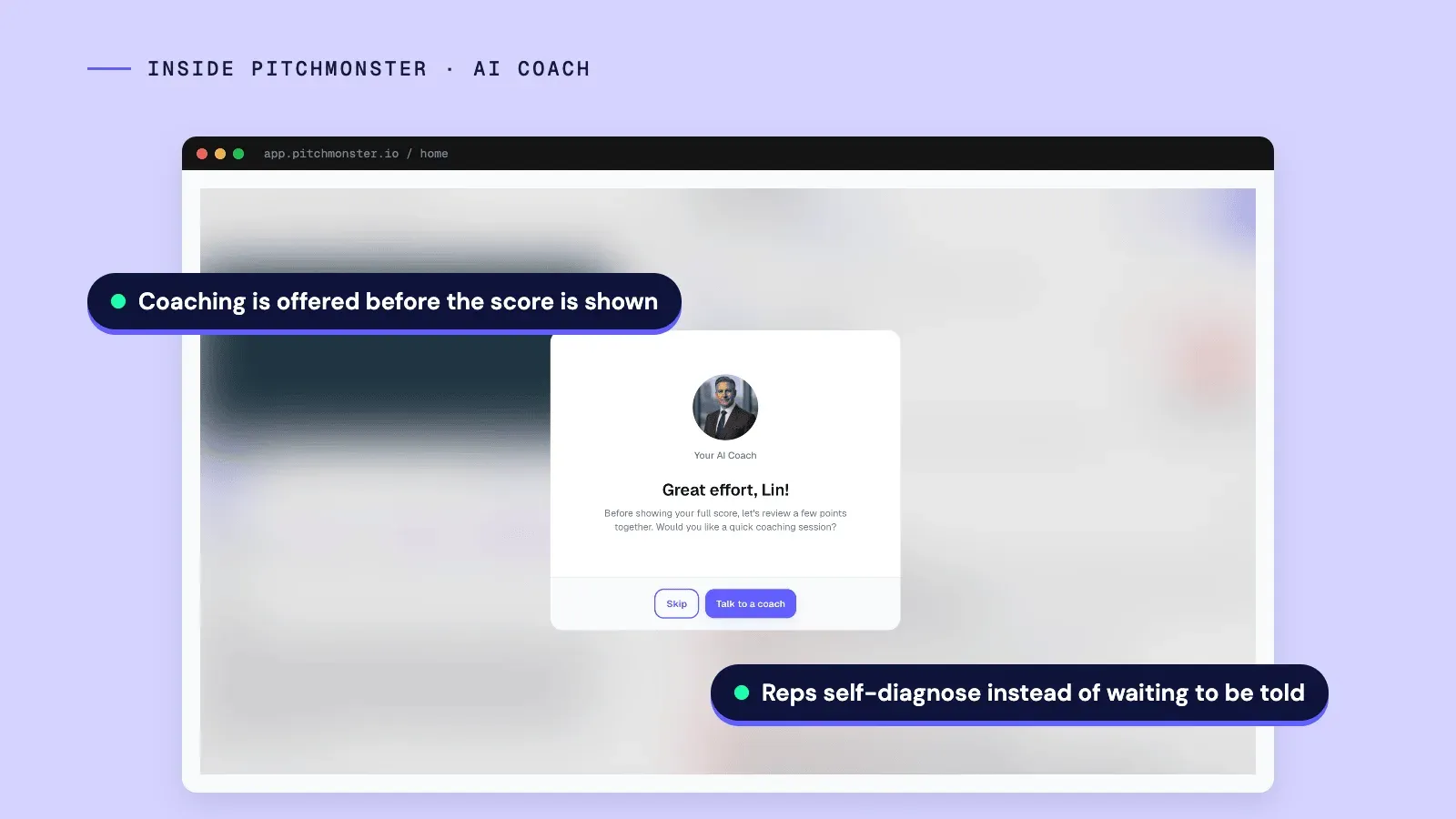
After a practice session, the AI Coach appears before the score and asks whether the learner wants a quick coaching session. The learner can skip or talk to the coach, which gives the person a chance to reflect before seeing the number.
The review includes a score out of 100, comparisons with the learner's last and first tries, star-rated topics and criteria marked TRUE or FALSE. Each failed criterion comes with written coaching and a worked example. Managers can add team comments, and a transcript and talk-track timeline are included.
PitchMonster team analytics for L&D
The workspace Analytics page combines adoption and readiness. It shows recordings and practice minutes over a date range, the average role-play score and the recordings scoring 80% or higher. A per-user table lists recordings, minutes, average score and 80%+ count.
Each role-play's Performance tab adds a scorecard breakdown rated out of 5 and a chart of improvement against the pass threshold. These are activity and readiness signals. They do not decide whether the scorecard measures the right skill.
PitchMonster data and rollout controls
PitchMonster supports 29 languages, EU data residency and SAML SSO. Mandatory notices before recordings and on analysis screens tell users they are interacting with an AI system; they address EU AI Act transparency obligations. Group hierarchy controls which results users can see, and admins can turn off the leaderboard for GDPR or company policy.
PitchMonster pricing
By quote; trials are sales-led. The quote is sized to your team and includes onboarding, a dedicated customer success manager and support, with no setup fees.
PitchMonster and Second Nature side by side
Second Nature is the nearest alternative in the practice group. This table compares the dimensions an L&D buyer weighs, using only what each vendor publishes.
Dimension |  PitchMonster | Second Nature |
|---|---|---|
Coaching and the score | AI Coach offered before the score is shown | Deal Coach gives AI coaching on live deals; timing against the score is not stated on the pages we read |
Scenarios | AI buyers built from links, files, real calls, connected apps or CSV | A virtual pitch partner; scenario sources are not stated on the pages we read |
Methodology scorecards | Templates (Challenger, SPICED, MEDDIC / MEDDPICC, PitchMonster Essentials) or custom | Scoring is listed; scorecard options are not stated on the pages we read |
Readiness analytics | Workspace Analytics for recordings, practice minutes and the share of recordings scoring 80% or higher, plus a per-role-play Performance tab | Not stated on the pages we read |
Compliance controls | EU data residency, SAML SSO, AI notices before recordings, leaderboard privacy toggle, group-scoped visibility | SAML is listed; other controls are not stated on the pages we read |
Route into an LMS | Webhook events on recording-complete and feedback-ready; ask in a demo about SCORM, xAPI or LTI | SCORM or LTI to any LMS |
Languages | 29 | 30+ |
Price | By quote | Not published; by quote |
Where PitchMonster falls short
PitchMonster is a practice and scoring tool, not a course library, authoring tool, LMS or video generator. It focuses on customer-facing and sales skills. A general-purpose L&D program still needs content and delivery tools from other groups.
Who PitchMonster is best for
PitchMonster fits mid-market and enterprise revenue, enablement and learning teams. They want customer-facing skills practiced and scored against their own scorecards, with adoption and readiness evidence afterwards.
Published results from public case studies follow. Mentor Group is the closest fit for an L&D reader because it runs onboarding programs for client teams.
- Mentor Group, a sales performance consultancy: 50% faster ramp-up on average and a 2X reduction in coaching time per rep. It added PitchMonster practice to its client onboarding programs.
- PRN Health Services: 22.37% higher scores on actual calls over 60 days.
- Syngenta, a Mentor Group client: message-delivery accuracy up 27% in 3 weeks, as published on the Mentor Group case study.
- Immersive, a Mentor Group client: new hires ramped 40% faster and onboarding fell from 10 weeks to 6 across 5 regions, on the same case page.
These results come from customer-facing and sales programs, not from L&D software in general.
2. Second Nature: conversational AI role-play with LMS links

Second Nature has a conversational AI practice partner, scoring and a Deal Coach module. It holds 4.6 out of 5 on G2.
What is Second Nature?
Second Nature is AI role-play sales training software with a conversational practice partner, scoring and a Deal Coach module. The vendor describes LMS connections through SCORM or LTI, plus CRM and conference-tool integrations. Its homepage lists 30+ languages and 24/7 access.
Second Nature key features
- Practice sales conversations with a virtual pitch partner.
- Score practice conversations and use Deal Coach for AI-driven live-deal coaching.
- Integrate with any LMS through SCORM or LTI.
- Use the platform on any device and in 30+ languages.
Second Nature pros
- SCORM or LTI connects the product to any LMS.
- The vendor lists 30+ languages.
- Deal Coach provides AI coaching on live deals.
Second Nature cons
- The vendor lists no public price and sells by demo request.
- Its CRM and conference-tool integrations are listed without product names.
- The vendor describes the product as AI role-play sales training software, so its stated scope is sales rather than general L&D practice.
Second Nature pricing
Second Nature does not publish a price and sells by quote.
Who Second Nature is best for
Second Nature fits sales teams that want conversational role-play connected to an LMS and live-deal coaching. For a direct comparison with a customer-facing practice tool, see PitchMonster vs Second Nature.
3. ELB Learning Rehearsal: video practice and AI role-play

Rehearsal combines video practice formats with AI role-play avatars and Mentor AI feedback. It holds 4.6 out of 5 on G2.
What is ELB Learning Rehearsal?
ELB Learning Rehearsal is a video practice and coaching platform with AI role-play avatars. Learners can practice through AI role-play scenarios, video responses, audio-only responses, screen recordings or Hot Seat, a one-attempt mode. Mentor AI analyzes several aspects of the response.
ELB Learning Rehearsal key features
- Use 5 practice formats, including AI role-play, audio and screen recording.
- Use Mentor AI to analyze transcript, pace, word count, response time and questions asked.
- Set required and prohibited keywords.
- Add team leaderboards and guided learning paths.
- Connect through API and LMS integration; 50+ languages are supported.
ELB Learning Rehearsal pros
- 5 practice formats cover different response types.
- LMS and API integrations are listed.
- The vendor states support for 50+ languages.
ELB Learning Rehearsal cons
- AI role-play costs more than the base Rehearsal price.
- Listed prices are for the United States only.
- The free trial length is not stated.
ELB Learning Rehearsal pricing
Rehearsal starts at $5,268 per year. Rehearsal with AI role-play starts at $7,768 per year. A free trial is offered; its length is not stated. Prices listed are for the United States only. Checked 25 October 2026.
Who ELB Learning Rehearsal is best for
Rehearsal fits teams that want video practice choices alongside AI role-play, feedback and LMS integration. Compare it when practice may include audio, screen recording or one-attempt exercises as well as avatars.
4. Yoodli: communication coaching with AI role-play

Yoodli has Role-plays, Personas, Create, Coach and Measure modules for communication practice. It holds 4.8 out of 5 on G2.
What is Yoodli?
Yoodli is an AI role-play platform for human skills, including sales training, onboarding, L&D and manager coaching. Its modules are Role-plays, Personas, Create, Coach and Measure. The vendor lists integrations with 21 products, including workplace, CRM and identity tools, and does not state a language count.
Yoodli key features
- Use Role-plays, Personas, Create, Coach and Measure modules.
- Connect with 21 listed integrations, including Zoom, Microsoft Teams, Slack, Salesforce, HubSpot, Gong, Okta, Workday and Highspot.
- Choose a free Starter plan with 5 lifetime sessions.
- Use Pro or Advanced individual plans for additional role-play capacity.
Yoodli pros
- Starter gives 5 lifetime sessions at no cost.
- Individual plan prices are published.
- The vendor lists 21 integrations.
Yoodli cons
- Business and Enterprise prices are not shown.
- Individual plans are for single users, not team rollout.
- The vendor does not state a language count.
Yoodli pricing
Starter is free for 5 lifetime sessions. Pro costs $8 per month billed annually and allows up to 10 role-plays per week. Advanced costs $20 per month billed annually and allows unlimited role-plays. Business and Enterprise are annual per-seat plans with no public price. Checked 25 October 2026.
Who Yoodli is best for
Yoodli works for people and teams exploring communication practice with role-plays and coaching modules. For a sales-specific comparison, see PitchMonster vs Yoodli.
Content authoring tools
Content authoring software helps L&D teams turn expertise, documents and learning goals into structured courses. The tools here include an established authoring suite, AI-first course builders and collaborative LMS authoring. Articulate 360, Mindsmith, Coursebox and 360Learning cover this job, with different ways to deliver finished learning.
5. Articulate 360: AI-assisted course authoring

Articulate 360 combines Storyline, Rise, Review and Reach with AI Assistant and Localization. It holds 4.7 out of 5 on G2.
What is Articulate 360?
Articulate 360 is a course authoring suite for building, reviewing and delivering workplace learning. Its apps include Storyline, Rise, Review and Reach, a built-in LMS. The package also includes AI Assistant and Localization, with Nova as the AI agent behind 360 AI and Frontline.
Articulate 360 key features
- Use Storyline, Rise, Review and Reach, plus AI Assistant and Localization.
- Export content to any LMS that supports SCORM or xAPI, or share it by link.
- Use AI translation into 80+ languages.
- Reach 360 Pro provides a built-in delivery option priced by active learners.
Articulate 360 pros
- Authoring, review, localization and delivery sit in one suite.
- SCORM and xAPI export support LMS delivery.
- AI translation covers 80+ languages.
Articulate 360 cons
- 360 AI Teams is priced per seat per year.
- Frontline AI use runs on credits.
- Reach pricing depends on active learners.
Articulate 360 pricing
360 AI Teams costs $1,749 per seat per year, while a single seat costs $1,449 per year. Frontline starts at $500 per year with 100,000 credits. Reach 360 Pro starts at $3,600 per year for 1,200 active learners. A 14-day free trial is available. Checked 25 October 2026.
Who Articulate 360 is best for
Articulate 360 fits teams that need authoring, review, localization and LMS export in a connected suite. Reach 360 Pro has its own active-learner pricing, while the authoring tiers use seat or credit models, so budget the 2 separately.
6. Mindsmith: interactive courses from source material

Mindsmith turns source material into interactive eLearning courses for LMS or direct delivery. It holds 4.8 out of 5 on G2.
What is Mindsmith?
Mindsmith is an AI-native course authoring tool that builds interactive learning from source materials. Teams can publish through an LMS, a link, a SCORM package or xAPI, and dynamic packages update when a new version is published. The vendor lists 70+ languages and an MCP connector for Copilot, Claude and ChatGPT.
Mindsmith key features
- Build interactive courses from source material.
- Choose from 30+ elements, including branching scenarios, interactive video, quizzes and simulations.
- Use an MCP connector with Copilot, Claude and ChatGPT.
- Work in 70+ languages and deliver through an LMS, link, SCORM or xAPI.
Mindsmith pros
- Source material can become a course without starting from a blank page.
- Dynamic packages update when changes are published.
- Delivery includes SCORM, xAPI, links and LMS options.
Mindsmith cons
- Plans are priced per author.
- The free plan includes 450 one-time AI credits.
- Professional and Business prices assume annual billing.
Mindsmith pricing
The free plan includes 450 one-time AI credits. Professional costs $39 per author monthly when billed annually, or $468 per year. Business costs $65 per author monthly when billed annually, or $780 per year. Enterprise pricing is custom. Checked 25 October 2026.
Who Mindsmith is best for
Mindsmith suits instructional designers who want to make interactive courses from source material and deliver them in multiple formats. Pricing scales by author rather than learner, so map your author count to the plan.
7. Coursebox: AI course creation with a built-in LMS

Coursebox creates courses from prompts or uploaded files and includes a built-in LMS. We found no G2 score for it in October 2026.
What is Coursebox?
Coursebox is an AI course creator with a built-in LMS, AI video avatars, quizzes and course selling. Teams can start from a text prompt or upload PDF, Word or PowerPoint files. It can create AI quizzes, grade work and provide an AI tutor for each course.
Coursebox key features
- Build a course from a prompt or uploaded files.
- Add AI quizzes, AI grading and a course-level AI tutor.
- Export courses as SCORM or LTI.
- Use the built-in LMS with unlimited learners on every plan.
- The vendor claims 100+ languages and 500+ video avatars.
Coursebox pros
- The free plan requires no credit card.
- Every plan includes unlimited learners.
- Course creation starts from files or a prompt.
- SCORM and LTI export are available.
Coursebox cons
- Paid prices are not shown on the pricing page.
- SSO costs $3,000 per year as a paid add-on.
- Enterprise requires a signed agreement with a 2-year minimum initial term.
Coursebox pricing
Coursebox lists Free, Creator, Pro, Pro + LMS and Enterprise tiers. The free plan is available without a credit card, and all plans include unlimited learners. Paid prices are not published. SSO is a $3,000-per-year add-on. Checked 25 October 2026.
Who Coursebox is best for
Coursebox fits teams that want to generate a course from source files or a prompt, then deliver it through a built-in LMS. Paid tier prices are not shown, so request a quote and include the paid SSO add-on and the 2-year Enterprise minimum term in your review.
8. 360Learning: expert-led courses on an LMS

360Learning combines collaborative course creation and an LMS, with an AI Content Builder. It holds 4.6 out of 5 on G2.
What is 360Learning?
360Learning is an AI-driven collaborative LMS where subject-matter experts build courses with L&D oversight. The platform lists an AI Content Builder, performance analytics, automated reporting and compliance, plus integrations with Workday, SAP, BambooHR, Slack, Salesforce and Oracle. The Team plan is billed monthly with no annual commitment.
360Learning key features
- Let subject-matter experts create courses within the LMS.
- Use the AI Content Builder with performance analytics.
- Connect with Workday, SAP, BambooHR, Slack, Salesforce, Oracle and 80+ more integrations.
- Choose a Team plan billed monthly without an annual commitment.
360Learning pros
- Authoring and delivery sit in the same LMS.
- The Team plan has no annual commitment.
- The platform lists more than 80 additional integrations.
360Learning cons
- The Team plan is capped at 100 users.
- The pricing page does not list which features each plan includes.
- Product interface languages are not stated.
360Learning pricing
The Team plan costs $8 per user per month for up to 100 users, billed monthly with no annual commitment. Business and Enterprise pricing is custom. The pricing FAQ mentions a 30-day free trial. Checked 25 October 2026.
Who 360Learning is best for
360Learning fits L&D teams that want subject-matter experts to contribute courses inside the platform learners already use. The Team plan stops at 100 users, so larger rollouts need a Business or Enterprise quote.
AI video tools
AI video tools help teams turn scripts, source documents and training outlines into narrated video or interactive learning. Synthesia and Colossyan both use avatars, while their course features and pricing structures differ. They may fit when video production is the bottleneck, especially for teams that need translation or branching content.
9. Synthesia: avatar training video

Synthesia makes avatar-led training video and includes interactive Sessions with role-play. It holds 4.7 out of 5 on G2.
What is Synthesia?
Synthesia is an AI video platform for business and training content that creates avatar videos and voiceovers. It also includes interactive Sessions, such as Role-play and Survey Sessions, plus an API. Video creation supports 140+ languages, while AI dubbing supports 130+ languages, and a free Basic plan is available.
Synthesia key features
- Create training videos with avatars and voiceovers.
- Use AI dubbing across 130+ languages.
- Run Role-play Sessions or Survey Sessions with interactive avatars.
- Export SCORM and use the listed API and MCP server.
Synthesia pros
- A free Basic plan is available.
- Video creation supports 140+ languages.
- Interactive avatar Sessions include role-play.
- SCORM export supports LMS delivery.
Synthesia cons
- Personal Avatars require an on-camera consent recording.
- Role-play learner seats are priced per learner.
Synthesia pricing
Basic is free, Starter is $29 monthly or $18 monthly when billed yearly, and Pro is $89 monthly or $64 monthly when billed yearly. Enterprise pricing is custom. Role-play learner seats cost $29 per learner monthly, or $25 when billed yearly. Checked 25 October 2026.
Who Synthesia is best for
Consider Synthesia when you produce avatar-led training video, particularly when translation, dubbing or interactive sessions matter. Its 140+ and 130+ language counts describe video creation and dubbing separately, and role-play learner seats are priced apart from the video plans.
10. Colossyan: training video from documents

Colossyan turns documents into training videos and courses, with branching interactive video. It holds 4.6 out of 5 on G2.
What is Colossyan?
Colossyan is an AI video platform that converts documents into training videos and courses for employees, partners and customers. Colossyan Learn builds courses with quizzes and SCORM export, while interactive video supports branching and quizzes that connect video content to learner decisions. The vendor lists 100+ languages and 300+ avatars.
Colossyan key features
- Turn documents into video and courses.
- Create full courses in Colossyan Learn with quizzes.
- Add branching and quizzes to interactive video.
- Choose from 300+ stock or custom avatars and 100+ languages.
- Export SCORM courses.
Colossyan pros
- Teams can start from documents.
- Interactive video supports branching.
- A free Starter plan is available.
Colossyan cons
- Professional includes 3 editor seats and 5 SCORM exports per month.
- Enterprise pricing is custom, with no public price.
Colossyan pricing
Starter is free. Professional costs $59 per month when billed yearly and includes 3 editor seats and 5 SCORM exports per month. Enterprise pricing is custom. Checked 25 October 2026.
Who Colossyan is best for
Colossyan suits teams that want to convert documents into video-led courses and add interactive branches. Compare your publishing cadence with the Professional plan's 5 SCORM exports per month, not only its monthly price.
LMS and learning platforms
A learning platform assigns, delivers and records learning, while some platforms also include AI authoring, skills features or knowledge tools. Docebo, TalentLMS and Absorb LMS are the core examples here. 360Learning and Coursebox also include delivery capabilities in their authoring groups. For a sales-focused comparison, see our guide to LMS options for sales training.
11. Docebo: enterprise LMS with skills and AI

Docebo combines learning delivery with skills intelligence, enterprise knowledge and AI agents. It holds 4.3 out of 5 on G2.
What is Docebo?
Docebo describes itself as an AI workforce readiness platform with Learning, Skills Intelligence, Enterprise Knowledge and AgentHub. Its pricing depends on product tier and active users, and the platform is typically suited to organizations training 250 or more learners. Contracts run for a minimum of 1 year, and most customers sign for 3 to 5 years.
Docebo key features
- Combine learning, skills intelligence, enterprise knowledge and AgentHub.
- Use a skills taxonomy across 45+ languages.
- Access a content marketplace with over 30,000 courses.
- Add role-play, analytics, extended enterprise, gamified learning or e-commerce.
- AI features use usage-based credits.
- Upload SCORM, xAPI and LTI content, per its help center.
Docebo pros
- LMS, skills and knowledge search sit in one platform.
- A role-play add-on is available.
- The content marketplace includes over 30,000 courses.
Docebo cons
- Public pricing is not listed.
- Contracts have a 1-year minimum, and most customers sign for 3 to 5 years.
- AI features use credits, while role-play is a paid add-on.
Docebo pricing
Pricing depends on product tier and active users, and the pricing page lists 2 tiers, an entry tier and Enterprise. No public price is shown. The minimum contract is 1 year. Checked 25 October 2026.
Who Docebo is best for
Docebo fits larger organizations that want learning delivery alongside skills intelligence and enterprise knowledge. Teams should account for contract length, usage-based AI credits and add-on pricing.
12. TalentLMS: LMS with AI course creation

TalentLMS combines cloud learning delivery with TalentCraft course creation and translation. It holds 4.6 out of 5 on G2.
What is TalentLMS?
TalentLMS is a cloud LMS for training employees, partners and customers. Its TalentCraft AI creates courses and translates them, and the pricing page also lists AI test creation and an AI Coach. The TalentLibrary of more than 1,000 ready-made courses is an add-on, and all plans list SCORM 1.2, Tin Can and cmi5.
TalentLMS key features
- Create courses and translations with TalentCraft, plus AI test creation, AI images and videos, and an AI Coach.
- Use SCORM 1.2, Tin Can and cmi5 on all plans, with LTI 1.3, API and single sign-on on the paid plans.
- Add the TalentLibrary of 1,000+ courses.
- Start with a free plan for up to 5 users and 10 courses.
- Translate entire courses into more than 40 languages.
TalentLMS pros
- A free plan has no time limit and needs no credit card.
- Monthly prices are published.
- TalentCraft AI creates and translates courses.
TalentLMS cons
- The course library is an add-on.
- Each listed price covers one user band: 1 to 40 users on Core, 1 to 70 on Grow and 1 to 100 on Pro.
- Enterprise starts at 1,000 users and is by quote.
TalentLMS pricing
The free plan supports up to 5 users and 10 courses. Core is $119 monthly for 1 to 40 users, Grow is $229 for 1 to 70 users, and Pro is $449 for 1 to 100 users. Yearly billing saves 20%. Enterprise starts at 1,000 users and is by quote. Checked 25 October 2026.
Who TalentLMS is best for
TalentLMS suits teams seeking a cloud LMS with a free starting plan and published monthly prices. It can work when course generation and translation are useful, with the course library treated as a separate add-on.
13. Absorb LMS: LMS with built-in AI authoring

Absorb LMS combines course delivery and AI authoring, with 3 named AI agents. It holds 4.6 out of 5 on G2.
What is Absorb LMS?
Absorb LMS is a corporate learning platform with built-in AI course authoring for internal and external learning. Absorb Create supports quizzes, videos, translations and voice-overs, and the platform names 3 AI agents: Aura Learn, Aura Create and Aura Admin Assist. It also lists e-commerce, so teams can sell courses. The vendor's website now sits on absorbai.com, and the product is still named Absorb LMS.
Absorb LMS key features
- Create courses with quizzes, video, translations and voice-overs.
- Use Aura Learn, Aura Create and Aura Admin Assist.
- Sell courses through e-commerce with 70 payment gateways.
- Integrate with ADP, Workday and Salesforce.
Absorb LMS pros
- LMS delivery and AI authoring are in one product.
- Course selling supports 70 payment gateways.
- The platform lists integrations with Workday, ADP and Salesforce.
Absorb LMS cons
- Public prices and plans are not listed.
- The pricing page is a quote request form.
- Pricing is organized around learner-count bands.
Absorb LMS pricing
The Absorb LMS pricing page asks buyers to request a quote and select learner-count bands from 1 to 50 through 25,000 or more. It does not show public prices.
Who Absorb LMS is best for
Absorb LMS is for organizations that want a corporate LMS with integrated AI course creation and course-selling features. Buyers should request a quote and review which capabilities sit in their proposed package.
Microlearning tools
Microlearning platforms deliver short lessons and reinforcement through channels learners already use. Qstream focuses on spaced learning challenges, and Axonify combines frontline learning with task execution. 7taps, a phone-first delivery platform whose pages name no AI features, is covered in a short note after the ranked entries.
14. Qstream: spaced microlearning and reinforcement

Qstream turns training into spaced challenges delivered through several channels. It holds 4.5 out of 5 on G2.
What is Qstream?
Qstream is an AI-powered microlearning and knowledge reinforcement platform built around spaced learning. Its AI Author Assistant can build programs from a prompt or convert existing training into microlearning challenges. Teams can deliver through email, a mobile app, Microsoft Teams or SMS, which Qstream added on 13 January 2026.
Qstream key features
- Build microlearning programs from a prompt or existing training.
- Deliver challenges through email, mobile app, Microsoft Teams and SMS.
- Use leaderboards and scenario-based testing.
- Review readiness analytics and manager coaching dashboards.
Qstream pros
- Existing training can become short challenges.
- 4 delivery channels are listed.
- Managers get coaching dashboards and readiness analytics.
Qstream cons
- The site lists no public pricing and directs buyers to request a demo.
- Qstream describes its product as microlearning and knowledge reinforcement, and its pages do not describe AI conversation practice.
Qstream pricing
Qstream does not publish pricing. The site directs buyers to request a demo.
Who Qstream is best for
Qstream fits teams that want ongoing knowledge reinforcement through short challenges, particularly where mobile, Teams, email or SMS delivery matters. Its site has industry pages for healthcare, pharma and medtech, and financial services. Managers can review readiness analytics and coaching dashboards after challenges are assigned.
15. Axonify: frontline microlearning and coaching

Axonify combines frontline microlearning, task execution and insights with named AI features. It holds 4.7 out of 5 on G2.
What is Axonify?
Axonify is an AI-powered frontline enablement platform that combines microlearning, task execution and insights. Its named AI features include AI-built content, quizzes, personalized learning paths, Max Assistant and Max Coach. Pricing depends on team size, locations and selected features, and the site has a Build a Quote form.
Axonify key features
- Create AI-built content, quizzes and personalized learning paths.
- Use Max Assistant and Max Coach.
- Track task assignment across locations with Checkpoint in Premium.
- Plan launches with Rollout AI in Premium.
- Add enterprise data integrations on Core and Pro, or use them in Premium.
Axonify pros
- Microlearning, reinforcement, leaderboards and AI authoring are in the base tier.
- 3 tiers are published: Core, Pro and Premium.
- Premium includes task tracking across locations.
Axonify cons
- Public prices are not listed.
- Max Coach starts with Pro.
- Enterprise data integrations cost extra below Premium.
Axonify pricing
Axonify sells 3 tiers: Core, Pro and Premium. Pricing depends on team size, locations and selected features, and the site provides a Build a Quote form. No prices are shown.
Who Axonify is best for
Axonify fits organizations training frontline staff across locations, especially when task tracking and learning need to work together. Check which tier includes coaching and data integrations before choosing a package.
A non-AI delivery option: 7taps
7taps is a phone-first microlearning delivery platform. We do not rank or score it because its homepage and pricing page name no built-in AI features. It holds 4.8 out of 5 on G2, and its pricing depends on audience size with no prices shown (checked 25 October 2026).
A lesson takes about 5 minutes. It reaches learners through Teams, Slack, text, WhatsApp, email, QR codes or shared tablets, and rosters sync from 45+ HR systems. It pairs with an authoring tool from the groups above.
Skills intelligence and L&D operations
Skills intelligence tools help organizations map capabilities and plan workforce development, while L&D operations software manages intake and workflow. Cornerstone spans learning, skills, talent and workforce planning. Cognota focuses on the operational work behind learning programs, rather than authoring or delivering courses.
16. Cornerstone: skills and talent platform for large enterprises

Cornerstone combines learning, skills, talent development and workforce planning. Its Cornerstone Learning listing holds 4.1 out of 5 on G2.
What is Cornerstone?
Cornerstone is an enterprise talent and learning platform branded Cornerstone Workforce AI, covering learning, skills, talent development and workforce planning. Its homepage names Readiness Agents called Future of Work, Embark Navigator and Skills Architect, and the vendor lists 50 languages as a product capability.
Cornerstone key features
- Combine learning, skills, talent development and workforce planning.
- Use Readiness Agents named Future of Work, Embark Navigator and Skills Architect.
- Choose from 3 packages covering learning, talent development and intelligence, plus HCM+ and Extended Enterprise+ as additional solutions.
- Support SCORM, AICC and xAPI content formats, per its Cornerstone Learning page.
- Use product capabilities listed across 50 languages.
- Add modules including Extended Enterprise, Content, Saba, SumTotal, Talent Marketplace and Skill Passport.
Cornerstone pros
- Learning, skills and talent are covered in one platform.
- The product lists 50 languages.
- Packages and agents can be added at any time, according to the pricing page.
Cornerstone cons
- The pricing page shows no prices; cost is by quote.
- Packages, Readiness Agents and extra modules are priced separately, so the full cost depends on the combination.
Cornerstone pricing
Cornerstone lists 3 packages and 2 additional solutions, HCM+ and Extended Enterprise+. The learning and talent development packages and HCM+ are licensed per employee per year, with cost by quote. The intelligence package and Readiness Agents use pricing bands based on total employee count. The site publishes no prices (checked 25 October 2026).
Who Cornerstone is best for
Cornerstone is aimed at large enterprises that look across learning, skills and talent development. Buyers should map required modules to their workforce plans and request package pricing.
17. Cognota: L&D request intake and operations

Cognota manages L&D intake and workflows as a LearnOps platform, not an LMS or authoring tool. It holds 4.8 out of 5 on G2 from limited public reviews.
What is Cognota?
Cognota is a LearnOps platform for L&D teams that covers intake, workflow, governance, AI agents and an expert marketplace. It describes its Assist Marketplace as including 3,000+ L&D experts and its Digital Team as AI agents. It is not an LMS or an authoring tool, so it sits alongside both.
Cognota key features
- Manage L&D requests and workflow in one place.
- Use Digital Team AI agents.
- Access the Assist Marketplace of 3,000+ L&D experts.
- Allow business partners and vendors to submit requests without paid licenses.
Cognota pros
- It manages L&D intake and workflow.
- A starting annual price is published.
- Requesters do not need paid licenses.
Cognota cons
- It does not author or deliver courses.
- The published starting price is $25,000 per year.
- Team, Enterprise and Transform plans require a quote.
Cognota pricing
Pricing starts at $25,000 per year and includes platform access, dedicated support and up to 5 user licenses. Team, Enterprise and Transform models are quote-only. Checked 25 October 2026.
Who Cognota is best for
Cognota suits L&D functions that need to manage requests, governance and workflow. It does not replace an authoring tool or an LMS, so plan for separate course creation and delivery systems.
AI tools for L&D teams pricing compared
The table shows public pricing structures listed by each vendor on 25 October 2026.
Tool | Pricing model | Published price | Free plan or trial | Checked on |
|---|---|---|---|---|
PitchMonster | By quote | By quote | Trials are sales-led | 25 October 2026 |
Second Nature | By quote | Not published | Not stated | 25 October 2026 |
ELB Learning Rehearsal | Annual | From $5,268 yearly for Rehearsal and $7,768 with AI role-play; US prices only | Free trial, length not stated | 25 October 2026 |
Yoodli | Per user; team by quote | Pro $8; Advanced $20 monthly, billed annually | Free Starter | 25 October 2026 |
Articulate 360 | Per seat yearly; credits | Frontline from $500 yearly; Teams $1,749 per seat | 14-day trial | 25 October 2026 |
Mindsmith | Per author monthly | Professional $39 monthly, billed annually | Free plan | 25 October 2026 |
Coursebox | Tiered plans | Paid prices not shown | Free plan | 25 October 2026 |
360Learning | Per user monthly | Team $8 per user monthly | 30-day trial per FAQ | 25 October 2026 |
Synthesia | Monthly; role-play per learner | Starter $29; Pro $89 monthly | Free plan | 25 October 2026 |
Colossyan | Monthly plans | Professional $59 monthly, billed yearly | Free Starter | 25 October 2026 |
Docebo | By quote; tier and active users | Not published | Not stated | 25 October 2026 |
TalentLMS | Monthly plans by user tier | Core $119; Grow $229; Pro $449 monthly | Free plan | 25 October 2026 |
Absorb LMS | By quote; learner bands | Not published | Not stated | 25 October 2026 |
Qstream | By quote | Not published | Not stated | 25 October 2026 |
Axonify | By quote; team and locations | Not published | Not stated | 25 October 2026 |
Cornerstone | Per employee yearly for 3 packages; bands for the intelligence package; by quote | Not published | Not stated | 25 October 2026 |
Cognota | Annual platform fee | From $25,000 yearly | Not stated | 25 October 2026 |
Docebo, Cornerstone, Second Nature and PitchMonster quote team rollouts. PitchMonster's quote is sized to your team and includes onboarding, a dedicated customer success manager and support, with no setup fees.
How to choose the right AI tools for L&D teams
Choose an L&D tool by starting with the work that currently blocks learning. If you cannot produce courses, compare authoring tools such as Articulate 360, Mindsmith or Coursebox first. If learners cannot access or complete training, begin with an LMS such as Docebo, TalentLMS or Absorb LMS, or a microlearning platform such as Qstream or Axonify. Add a practice tool when a program needs people to rehearse a real conversation and gives managers a way to review that practice. The "Types of AI tools for L&D teams" list above maps each need to the tools that cover it.
Use this checklist once the job is clear.
A focused trial should include the people who will build content, administer delivery and review learning outcomes. Compare the same workflow across shortlisted tools, then confirm the price and integration details in writing.
What AI can and cannot do for skill practice
AI skill practice can generate a scenario, play a buyer, score a conversation and give written coaching. It can support repeated practice with consistent scorecards. It cannot replace a manager's judgment on a live deal. It cannot decide whether the scorecard measures the right skill, because a person sets the standard and interprets the outcome.
In PitchMonster, the AI Coach asks reflective questions before revealing the score. Other tools in this group use avatar role-play, video responses, communication coaching or a virtual pitch partner. These formats make practice repeatable, but the organization still owns the judgment behind the rubric.
From content to behavior: where practice fits an L&D program
An L&D program moves from content to behavior when learners first get source material, then practice applying it. A content tool teaches a concept, a platform delivers it, and a practice tool lets people try a conversation. The flow can run from source material to a scenario, scorecard, practice, feedback and analytics.
A learning team can build a practice scenario around a customer-facing moment from a link, a file or a real call. It can then score the practice against criteria from its own method. Guides to sales onboarding and sales coaching cover adjacent program needs.
This sequence fits programs where knowing a process and performing it in a live conversation are different skills. Managers can review recordings and score patterns, then adjust the training or scorecard when the evidence suggests a gap.
EU AI Act, data residency and SSO: what L&D should ask every AI vendor
L&D buyers should ask every AI vendor where learner data is stored and which login methods are supported. They should also ask how users are told they are interacting with AI. These questions matter when practice involves recordings or generated feedback. Check contractual terms and admin controls alongside the vendor's explanation of its product.
PitchMonster supports EU data residency and SAML SSO. Its notices before recordings and on analysis screens tell users they are interacting with an AI system; they address EU AI Act transparency obligations.
For every other tool, ask the vendor how it informs users about AI, where data is stored and which login methods it supports. See our guide to AI role-play and GDPR in Europe for a focused discussion of those rollout questions.
Want scored practice for your customer-facing teams?
PitchMonster adds conversation practice and scored feedback for customer-facing teams that need learners to rehearse what they will say. To see it with your own content, book a demo.
Frequently asked questions
What are the best AI tools for L&D professionals?
The best L&D AI tools depend on the team's job: authoring, video, platforms, reinforcement, skills operations or practice. Articulate 360 and Mindsmith support authoring, Synthesia makes avatar video, Docebo handles learning with skills features, Qstream reinforces knowledge, and PitchMonster scores customer-facing conversation practice.
How are L&D teams using AI?
In the tools reviewed here, AI for corporate training teams drafts courses from source material and makes video and translations. It also delivers short lessons, maps skills and runs practice conversations with feedback. Authoring and video tools support content production, LMS products distribute learning, microlearning tools reinforce knowledge, and practice tools let learners rehearse applied skills.
What is the best AI tool for creating training content?
The best AI tool for creating training content depends on how a team builds and delivers courses. Articulate 360 exports to SCORM or xAPI, Mindsmith creates interactive courses from source material, and Coursebox builds from a prompt or uploaded files. Match the pick to your content format and delivery path.
How can AI be used for skill practice in L&D?
AI can play another person in a scenario, score the conversation and provide written coaching. ELB Learning Rehearsal has AI role-play avatars and video formats, while Yoodli has role-play and coaching modules. Second Nature scores conversations with a virtual pitch partner. PitchMonster scores customer-facing practice against scorecards.
What should an L&D team check before buying an AI tool?
An L&D team should check delivery standards and LMS fit, EU data residency and SAML SSO, AI notices, language support and post-training evidence. Ask how users are told they are interacting with AI, and whether the system provides reports, exports or webhooks. PitchMonster supports EU data residency, SAML SSO, 29 languages and event webhooks.
Do AI tools replace instructional designers?
AI tools do not replace instructional designers because a person still decides what to teach, checks accuracy and judges whether learners can do the task. These products can help L&D teams draft content, generate media or deliver practice, but people remain responsible for learning goals and review.
What are the best AI microlearning platforms?
The best AI microlearning platforms depend on the delivery and reinforcement need. Qstream turns training into spaced challenges, and Axonify combines frontline learning with task execution. 7taps sends phone-first lessons through workplace channels but lists no built-in AI features, so it sits outside the ranked 17.
Which AI tools for L&D support SCORM or xAPI?
Several AI tools for L&D list SCORM or xAPI support. Articulate 360 exports SCORM or xAPI, Mindsmith delivers SCORM packages or xAPI, and Coursebox exports SCORM or LTI. Colossyan and Synthesia list SCORM export, while Second Nature connects to any LMS through SCORM or LTI.
The bottom line
Start with the job. For scored practice of customer-facing conversations, PitchMonster is our pick, and Second Nature and ELB Learning Rehearsal cover other forms of practice. Articulate 360 suits course authoring for its suite breadth, and Docebo suits an enterprise LMS with skills features and AI agents. Shortlist tools around the work your program needs to change, then book a demo to see scored practice with your own content.